Storyboard
A storyboard is a sequence of panels that plans a video’s shots, compositions and actions before production. Notes can describe movement, dialogue and transitions between panels.
A storyboard turns a script or idea into a visual sequence. Each panel represents a shot or an important change within it, so you can check what the viewer sees first, what happens next and how one moment connects to another.
For motion graphics, panels might show a headline, a chart, a product interface or a logo reveal. They do not have to be polished illustrations. Adobe’s introduction to storyboarding explains how planning shots and their order helps shape a story.
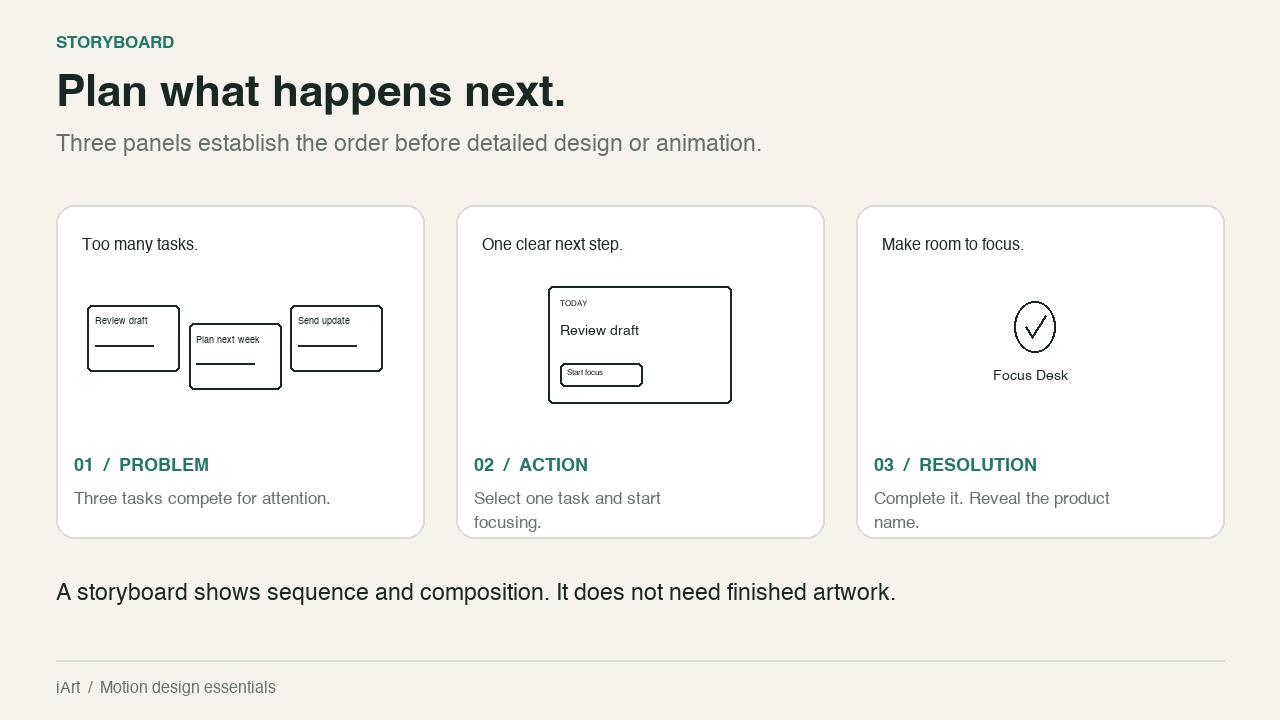
What a storyboard should show
- Composition: the subject, its position and the space for text.
- Action: what changes during the shot. Arrows or short notes can indicate movement.
- Words: essential on-screen copy and the corresponding narration, if any.
- Continuity: how the viewer recognises an object as it moves or changes between panels.
In the fictional Focus Desk example, three competing task cards become one selected task, followed by a completion mark and product name. That sequence communicates a single idea. Adding another feature would need another story beat, not just a smaller caption in an already crowded frame.
How to make a storyboard for motion graphics
- Write the message first. Use the motion design brief to choose what the viewer must understand.
- Break it into visual beats. Give each new idea or important change a panel. Panel count depends on the story, not a fixed number per second.
- Sketch the essential shapes and copy. Use boxes and labels for interfaces. Keep the planned video aspect ratio.
- Annotate the transitions. State which elements persist, enter or leave. Use a second panel if one drawing cannot explain a change.
- Read the sequence without explaining it aloud. If a connection is missing, revise the panels before spending time on finish.
Storyboard vs. style frame vs. animatic
A style frame establishes the intended visual finish. A storyboard establishes the sequence. An animatic puts those panels on a timeline to test timing. One polished frame cannot tell you whether the whole story fits its duration.
Using the plan to create an animation
Translate each panel into a scene instruction: what is visible, what changes and what must remain readable. In iArt, use those instructions to describe the animation and review the result against your sequence. For a complete production example, see how to create an animated explainer video.
Related: explainer video, motion graphics.