Motion Design Brief
A motion design brief is a short document that defines an animation’s goal, audience, key message, visual direction, required assets and delivery constraints before production starts.
A motion design brief gives a designer or animation tool enough context to make useful choices. “Make it modern” leaves the message, audience and deliverable undecided. A brief states what the video must communicate, where it will appear and what a successful result looks like.
It can be a page, a shared document or a structured message. School of Motion’s project workflow places the initial concept and brief before detailed production, with scope agreed early.
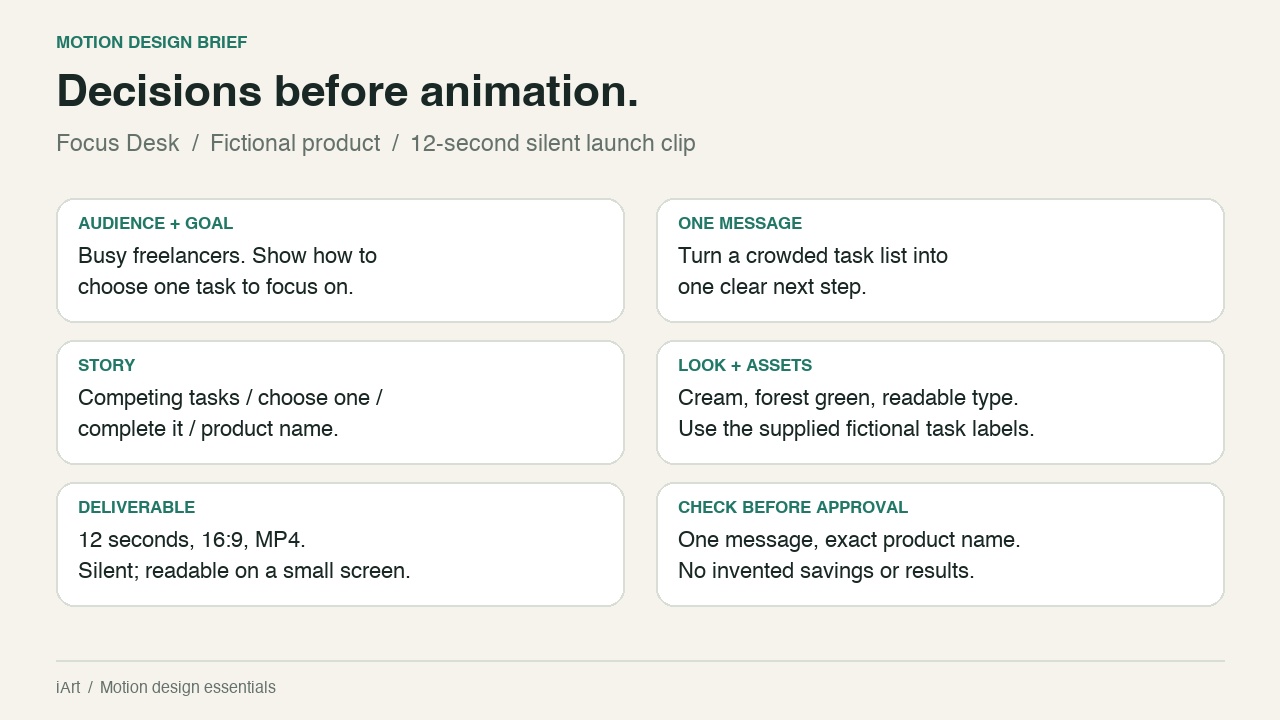
What goes in a motion design brief?
- Goal and audience: who is watching, and what should they understand or do?
- One main message: the idea that must survive even if the viewer remembers nothing else.
- Content and assets: exact copy, product screenshots, logos, figures, and which materials are approved for use.
- Visual direction: colours, type, references and the specific quality to borrow from each reference, such as restrained pacing or a clear information hierarchy.
- Deliverables: duration, aspect ratio, destination, output format, language and audio requirements.
- Constraints and approval: deadline, budget, reviewer, required claims and things the animation must avoid.
How to write a useful brief
Start with the communication problem, then add the requirements that change production decisions. For a fictional task app, “show how to choose one task” is more actionable than “showcase productivity.” Replace vague quality words with observable instructions: keep the task label readable, show one selected item, and leave the product name on screen long enough to read.
Use this short structure and replace the brackets with your own requirements:
Brief vs. script, storyboard and prompt
The brief defines the assignment. A script supplies the words and actions; a storyboard arranges the pictures. A prompt is an instruction sent to a tool: it may contain the whole brief, or ask for just one step. A detailed prompt still needs a clear goal.
When creating motion graphics in iArt, use the brief to explain the intended result, then give specific feedback on the generated draft. For worked examples of structuring instructions, see Claude motion graphics; for a product workflow, see how to make a product launch video.
Related: style frame, animatic, motion graphics.