How to Make a Lyric Video (Step by Step, With an AI Option)

A lyric video is a music video where the lyrics themselves are the visual — animated text, timed to the song, doing the work a performance or a narrative would otherwise do (the animation style behind most of them is kinetic typography; full definition in our glossary). This guide is the step-by-step for actually making one: how to prepare the lyrics, how to time and style the text, and the two routes to build it — animating by hand, or describing the video to an AI generator. We tested the AI route first-hand: two complete 20-second lyric videos generated from written briefs carrying our own original lyrics, the second including one revision prompt, which we document below.
What makes a lyric video work
A lyric video lives or dies on one thing: whether the viewer can read every word at the speed the song sets. Everything else is style. The videos that work share a few habits:
- Sync beats spectacle — words must land when they're sung. A plain video in perfect sync beats a beautiful one that drifts.
- One or two type treatments — a lyric video is not a font showcase. Pick a display face for emphasis words and a workhorse for the rest.
- Readable at a glance — each line stays on screen long enough to read twice. If a line flashes past, it may as well not be there. Subtitle guidelines are a useful ceiling: Netflix's style guide allows at most 20 characters per second for adult programming (Netflix Partner Help Center).
- A palette that matches the song — two or three colors, chosen from the track's mood, kept consistent from first line to last.
- Emphasis is spent, not sprayed — scale pops and color shifts go on the hook words. If every word pops, none do.
How to make a lyric video, step by step
Step 1: Sort out the rights first
Before any design: confirm you have the right to use the song and its lyrics. Your own original music or lyrics — no problem. A commissioned track or a licensed instrumental — check that the license covers lyric display. Someone else's released song — you need permission from the rights holders (typically the publisher for lyrics), even for a "fan-made" lyric video; platforms take these down routinely. The composition (music and lyrics) and the recording are two distinct copyrighted works (U.S. Copyright Office), and YouTube states its role is to remove content when a valid copyright removal request is submitted (YouTube Help). Every step below assumes this one is settled. For our test runs we wrote the lyrics ourselves and synthesized our own instrumental.
Step 2: Write out the lyrics as timed lines
Transcribe the section you're animating — verse, chorus, or full song — into short lines, one breath each, in exact order. This line sheet is the skeleton of the whole video: the animation follows it line by line, so fix punctuation, capitalization, and any stylized spellings now, not after the text is animated. One clarification for the generated route: if your track has vocals, the tool transcribes the singing itself — there, this sheet is your verification checklist for Step 7, not required input.
Step 3: Mark the emphasis words
Go through the line sheet and mark the words that carry the song — usually the hook, the title phrase, and one or two emotional peaks per section. These are the words that earn a scale pop, a color shift, or a beat of extra hold. Three or four marked words per chorus is plenty.
Step 4: Pick the visual language before animating
Decide three things up front: the background (a solid color, a subtle gradient, or a slow texture — busy footage fights the text), the palette (two or three colors from the song's mood), and the motion vocabulary (word-by-word reveals for conversational lines, scale pops for hooks, slides for transitions). Locking this before production is what keeps a three-minute video coherent.
Step 5: Build it — by hand or by brief
The manual route: a timeline editor — After Effects, or one of the free alternatives we tested — where you place each word on the timeline against the waveform and keyframe its entrance. Budget roughly an hour per 30 seconds of song once you're fluent, more while learning. The generated route: describe the video to an AI motion graphics agent — iArt's lyric video maker — the way you'd brief a motion designer: paste your timed lines, name the style, mark the emphasis — and if you have the track, attach it before submitting (that's Step 6). Our first test brief, verbatim:
"Create a 20-second kinetic typography lyric video for an indie-pop chorus. Lyrics, in this exact order: "City lights go quiet, but we're still awake" / "Every wrong turn tonight was a turn worth taking" / "Hold the moment steady, let the echoes fade" / "We were never lost — we were on our way". Each line gets roughly equal screen time, with words appearing in sync like a real lyric video. Style: bold kinetic typography on a deep navy background, warm amber and off-white text, subtle glow, late-night city mood; mix scale pops, word-by-word reveals, and one line sliding in; end holding the final line. Use only the lyrics I provided — do not change, add, or invent any words. No artist name, no watermark."
Note the structure — it's Steps 2–4 written down: the lines in order, the style decisions, the emphasis plan. That hard rule at the end matters: a generator will otherwise improvise text, and a lyric video with improvised lyrics is worthless.
Step 6: Sync to the actual track
If you're animating by hand, this is the timeline work: each word placed against the waveform. In the generated route, the tool we tested takes the track itself as input — an "add audio to sync to" step before generating. It listens before it animates: when we uploaded our instrumental into the vocal-sync mode, it came back with "No words found — is this instrumental? Use the Beat tab" — vocals are transcribed to sync lyrics to them, and instrumentals are routed to beat-sync instead. We verified both sides. Voice: we uploaded a spoken voiceover of our four lines; it was tagged as 16 seconds of English, and in the finished video each line's on-screen entrance matched the timestamp where it's spoken in our file — 0:00, 4.5s, 9.3s, and 13.4s. A real recorded song passed the same test: a 25-second choral excerpt of a 1597 English lute song (a Creative Commons recording) was tagged as English and rendered word-for-word in time with the singing. One honest catch: the transcription mishears the odd word — "There" for "The" in that pass; a later pass over the same file misheard a different short phrase, so the errors vary run to run — and the screen follows the transcription even when your brief carries the correct line. The fix is a one-sentence revision prompt; the check in Step 7 is how you catch it. We also ran the inverse test: a style-only brief with no lyrics provided at all — the finished video rendered the transcribed sung words in sync, confirming the track alone is enough input on the vocal path. Beat: it analyzed our self-made 100 BPM instrumental as exactly 100 BPM and timed word entrances to the music grid and the transient hits it detected.
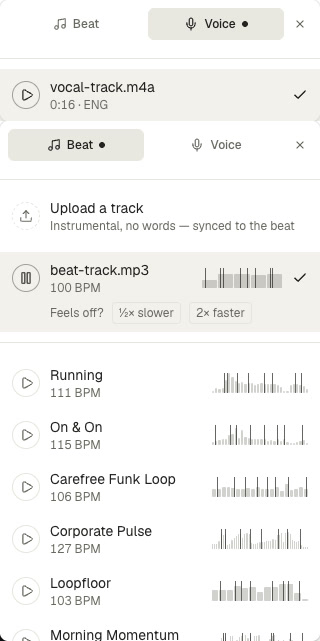
The two audio-sync modes as we tested them: the Voice tab tagged our track as 16 seconds of English; the Beat tab detected our instrumental at exactly 100 BPM, with a built-in track library below.
Step 7: Check every word, then export to the platform's spec
Read the finished video against your line sheet word by word — one wrong word ships the wrong lyrics to everyone, and with generated output this check is non-negotiable. Then export to where it's going: 16:9 for YouTube, 9:16 for Shorts, Reels, and TikTok, 1:1 for square feeds. In the tool we tested, aspect ratio is a picker you set before generating, so decide the destination first.
What our two test runs produced
Run 1 — 16:9 chorus, no audio. From the brief above, the agent gave each line five seconds and its own treatment: a word-by-word reveal ending on a glowing badge for "AWAKE", a dual-edge slide-in with "wrong turn" boxed in amber, a framed lock on "STEADY" with a ghost-echo trail across "echoes fade", and a scale-pop climax on "NEVER LOST —" holding "on our way" to the end. We read all 600 frames against the line sheet afterward: four lines, letter-perfect, no invented words.
Run 1 as exported: five seconds per line, emphasis where the brief marked it — no revisions needed.
Run 2 — 9:16 vertical, synced to a real track (one revision). The second run tested the audio route and the vertical format together: our own synthesized instrumental uploaded for beat-sync, aspect set to 9:16, and a slower acoustic verse. The honest part first: the first render had a real defect — line one played beautifully, then the screen stayed blank from about the 11-second mark, with lines three and four never appearing. The fix was one follow-up message describing exactly that ("line 2 only shows the single word Coffee; lines 3 and 4 never appear"), which took a minute or two; the re-render brought all four lines in, word-perfect, with entrances timed to the transient hits the beat analysis had flagged. The takeaway for the workflow is Step 7: check every frame, and when a run fails, the revision is a sentence, not a rebuild.
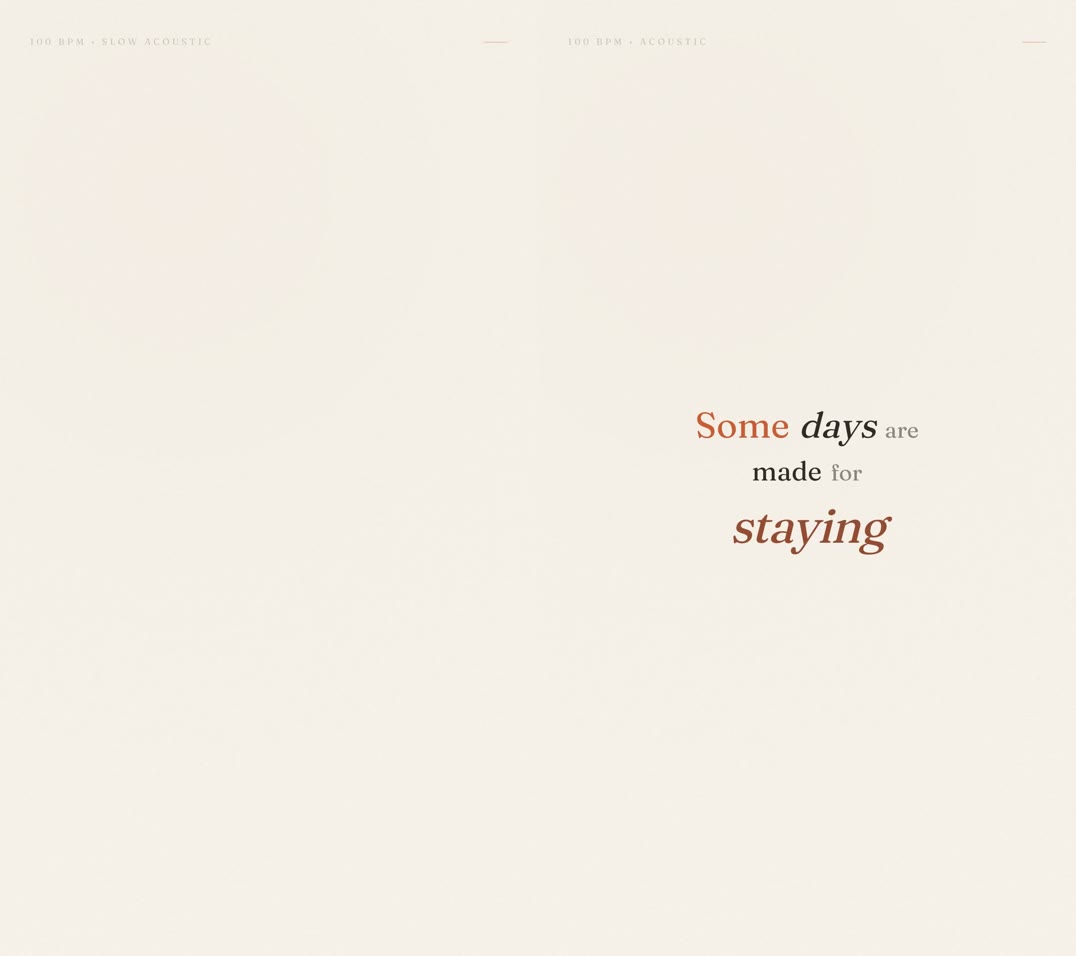
The same frame (14s) before and after the one-sentence revision: the first render left line three blank; the re-render shows "Some days are made for staying" in full.
Run 2 after the revision, with sound: the beat-synced vertical cut — words landing on the hits of the uploaded 100 BPM track.
FAQ
What software do I need to make a lyric video?
Two options. A timeline animation tool — After Effects, or a free alternative like Cavalry — where you keyframe each word against the waveform yourself; expect a real learning curve and hours per song. Or an AI generator like iArt, where you paste the lyrics and style as a written brief: a 20-second lyric video costs about $0.50–$0.80 to generate plus $0.09 for the 1080p export, a few minutes from brief to file (downloading the MP4 is a Pro feature).
Can I legally make a lyric video for any song?
No — the recording and the lyrics are copyrighted separately, and a lyric video uses both. You're clear with your own original music, commissioned work, or tracks licensed for lyric display; for someone else's released song you need permission from the rights holders. When in doubt, ask the publisher — platforms remove unlicensed lyric videos routinely.
How does AI sync the text to the music?
The tool we tested takes the audio file as an input before generating and listens to it: tracks with words are transcribed so the lyrics sync to the spoken or sung timing, while instrumentals are routed to beat analysis. We tested both in August 2026: a voiceover of our four lines produced a video where each line appeared at the exact second it's spoken (0:00, 4.5s, 9.3s, 13.4s in our file), and our self-made instrumental was identified as exactly 100 BPM — the tempo we synthesized it at.
What size should a lyric video be?
Match the platform: 16:9 (1920×1080) for YouTube, 9:16 (1080×1920) for Shorts, Reels, and TikTok, 1:1 for square feed posts. If you're generating rather than hand-animating, set the aspect ratio before generating — in the tool we tested it's a picker with exactly those three options, and our two runs used 16:9 and 9:16.
Do I have to type out the lyrics?
Not if your track has vocals — the words come from the transcription. In our August 2026 test we uploaded a song with a style-only brief, no lyrics provided, and the finished video rendered the sung words in sync. Typed lyrics are for the manual route, instrumentals, and no-track briefs — and they double as your verification sheet, because the on-screen text follows the audio transcription.
How do I keep AI-generated lyrics accurate?
State the rule in the brief — ours ended with "use only the lyrics I provided — do not change, add, or invent any words" — then read the finished video against your line sheet word by word. Across our two test runs every rendered word matched the brief; the defects we hit were a rendering gap (missing lines, not wrong ones) and, in our real-song test, words misheard by the vocal transcription ("There" for "The" — which words varies between passes over the same file) — each caught by exactly this check and each fixed with a single follow-up prompt.