DeepSeek Flash 1017 Animation: 8 Styles Tested

DeepSeek released DeepSeek Flash 1017 on October 17, 2026. Its official results report 77.0 on DeepSWE v1.1 and 42.3 on Terminal-Bench 4.0, up from 74.2 and 31.2 for the September release.
We tested DeepSeek Flash 1017 across eight animation styles in iArt to see where those coding capabilities translate into strong visuals—and where they fall short.
Our verdict: ink wash, pixel art and risograph were the strongest styles in this batch. Cut paper and cyanotype captured the look but missed finer details. Clay and silk were less convincing as materials, while op art worked better as flat geometry than as a depth illusion. Below are the videos, our observations and the prompts for each test.
Try the latest DeepSeek model for animation
Start with your own idea in iArt.
Try latest DeepSeek model for animation →Eight DeepSeek Flash 1017 animation styles at a glance
| Style | What landed | What to check |
|---|---|---|
| Ink wash | Negative space, delicate branches, restrained color | Procedural-looking brush texture |
| Pixel art | Silhouettes, palette, light-led story | Small boat in wide shots |
| Risograph | Print palette and final poster | Literal morphs and musical sync |
| Cut paper | Layered depth and object journey | Overly neat paper edges |
| Cyanotype | Blue-white print atmosphere | Botanical forms and subject size |
| Clay | Rounded pot and lettering | Flat, translucent leaves |
| Silk weaving | Visible crossing structure | Coarse fibers and hard highlights |
| Op art | Distinct geometric stages | Convincing depth illusion |
Find a style. Make it your own.
Choose a film below, then click “Try this prompt in iArt”. The complete prompt opens in Motion mode for you to edit. Select DeepSeek before generating. You can also expand and copy each prompt without leaving this page.
1. Ink wash: leave room for the picture to breathe
Our take: Worth exploring for quiet illustrated sequences and atmospheric title pieces.
AFTER THE RAIN makes ink wash convincing through diluted black, delicate branches and empty paper. A willow grows, rain falls and two birds cross the frame before a red seal closes the sequence.
The composition stays readable because the brushwork and subjects share a restrained palette. Some edges still look procedural: this is an ink-wash-inspired illustration, rather than a faithful simulation of brush pressure.
Prompt lesson: Start with one dominant subject and a restrained palette. Describe the concentration of ink, the paper and the empty space separately. “Make it artistic” gives much less direction.
Create a complete polished 16-second 1280x720 animation with a coherent beginning, transformation and resolution. Draw all artwork in code, no external assets. Compose a fitting original synthesized soundtrack without narration. Use clear silhouettes, detailed intentional art direction, well-spaced readable typography and purposeful camera/motion. Inspect rendered frames and fix visible errors before delivering. Creative brief: Traditional ink-wash on warm rice paper. A single brushstroke unfurls into a willow branch; two swifts dart through rain, their trails briefly forming ripples in a pond, then the sky clears into generous negative space with a small red seal. Title AFTER THE RAIN. Soft feathered ink edges, diluted layered grey washes, dry-brush accents, expressive curved flight paths, quiet asymmetry, no hard vector clip-art aesthetic.
Show full prompt ▾Show less ▴
2. Pixel art: give the style a small story
Our take: A promising direction for short illustrated stories with clear silhouettes.
LAST LIGHT gives pixel art a clear action: a lighthouse keeper lights a lamp, and its beam finds a fishing boat. Navy, teal and amber separate the storm from the point of attention.
The lighthouse silhouette, layered waves and title read well. The boat is small in wide shots, so the rescue needs a phone-size playback check. The requested 16-bit look does not establish compliance with historical console limits.
Prompt lesson: Name the palette, the important silhouettes and the action that connects them. If a small object carries the story, specify how large it should appear in the key shot.
Create a complete polished 16-second 1280x720 animation with a coherent beginning, transformation and resolution. Draw all artwork in code, no external assets. Compose a fitting original synthesized soundtrack without narration. Use clear silhouettes, detailed intentional art direction, well-spaced readable typography and purposeful camera/motion. Inspect rendered frames and fix visible errors before delivering. Creative brief: Cinematic 16-bit pixel-art island lighthouse during a storm. An isolated keeper switches on the amber lamp; its sweeping cone finds a tiny fishing boat, guiding it through layered teal waves into a sheltered bay. Clouds part and stars appear. Title LAST LIGHT. Strict pixel grid and limited navy/teal/amber palette, stepped pixel edges, parallax clouds, deterministic rain, legible boat silhouette, a real rescue story with a warm resolution.
Show full prompt ▾Show less ▴
3. Risograph: build a poster that can move
Our take: A useful visual direction for animated editorial posters.
AFTER HOURS works best as a moving jazz poster. Coral, navy and cream connect the trumpet, bass, keys and records; offset edges establish a recognizable print direction.
The final poster is more convincing than the literal morphs. A sound ring becoming a bass reads as a graphic transition, rather than one continuous transformation. The soundtrack is present, but precise beat synchronization was not verified.
Prompt lesson: Specify the ink colors, recognizable shapes and final poster layout. Treat seamless morphing and exact musical synchronization as separate requirements to verify.
Create a complete polished 16-second 1280x720 animation with a coherent beginning, transformation and resolution. Draw all artwork in code, no external assets. Compose a fitting original synthesized soundtrack without narration. Use clear silhouettes, detailed intentional art direction, well-spaced readable typography and purposeful camera/motion. Inspect rendered frames and fix visible errors before delivering. Creative brief: A risograph jazz-night poster comes alive. A single brass trumpet exhales concentric coral sound rings; the rings turn into a walking double-bass silhouette, dancing piano keys and spinning midnight records. Finish as a bold editorial poster with AFTER HOURS / ONE NIGHT ONLY. Inky navy, fluorescent coral and warm cream, deliberately misregistered two-colour printing, visible halftone dots, playful asymmetric typography, sharp rhythmic cuts and visual syncopation.
Show full prompt ▾Show less ▴
4. Cut paper: layers work better than material realism
Our take: Worth trying for layered storybook motion and object-led journeys.
MIDNIGHT MAIL establishes layered paper depth more convincingly than physical paper texture. An envelope leaves an amber booth, becomes a bird and travels toward a window across indigo clouds.
Offset shadows separate foreground and background, while the object journey keeps the sequence understandable. Many edges remain too tidy for hand-cut stock. The result works as layered illustration, with room to improve material irregularity.
Prompt lesson: Describe edge irregularity, paper thickness, offset shadows and movement cadence. A cut-paper label alone leaves too many material decisions unspecified.
Create a complete polished 16-second 1280x720 animation with a coherent beginning, transformation and resolution. Draw all artwork in code, no external assets. Compose a fitting original synthesized soundtrack without narration. Use clear silhouettes, detailed intentional art direction, well-spaced readable typography and purposeful camera/motion. Inspect rendered frames and fix visible errors before delivering. Creative brief: Layered cut-paper miniature. An amber postal booth floats among indigo paper clouds. A vermilion envelope slips through its slot, unfolds into a swallow, flies past postage-stamp moons, then delivers a glowing letter to a distant window. Cream, indigo, vermilion, muted gold; tactile irregular paper edges, offset paper shadows, 12fps handmade motion with smooth parallax camera. End title MIDNIGHT MAIL, subtitle For the words that cannot wait.
Show full prompt ▾Show less ▴
5. Cyanotype: a convincing palette can hide an unclear subject
Our take: Good visual atmosphere; subject accuracy needs closer inspection.
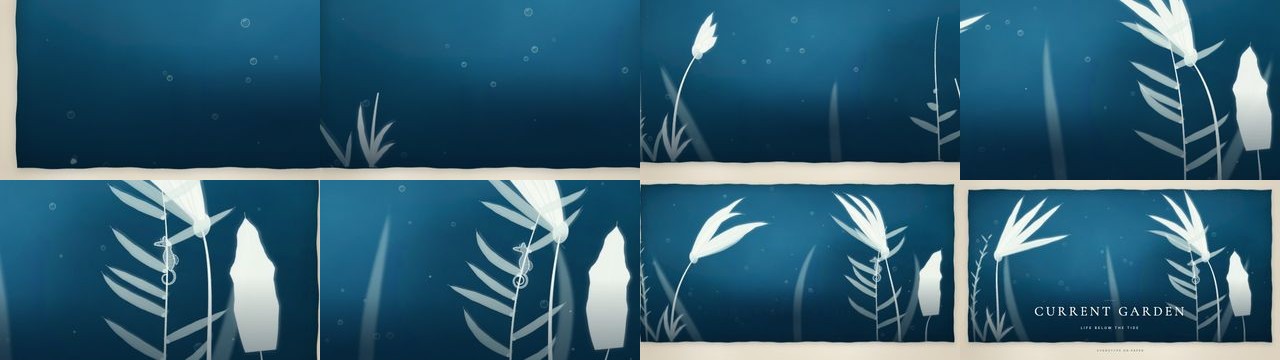
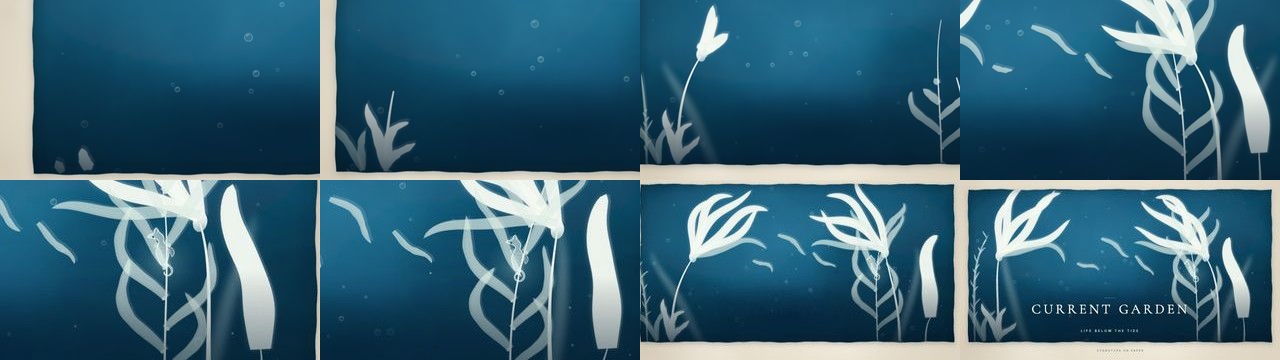
CURRENT GARDEN establishes cyanotype through Prussian blue, pale impressions and translucent overlaps. Its subject accuracy is weaker: the original plants resemble leafy branches more than kelp, and the seahorse is small in wide shots.
A targeted follow-up produced broader, curved blades and partially improved the underwater reading. The wide view still needs more emphasis on the creature. The comparison below shows that improvement without treating it as a complete botanical correction.
Prompt lesson: For recognizable plants or animals, describe structure and screen size as well as style. A distinctive material treatment cannot compensate for an ambiguous silhouette.
Create a complete polished 16-second 1280x720 animation with a coherent beginning, transformation and resolution. Draw all artwork in code, no external assets. Compose a fitting original synthesized soundtrack without narration. Use clear silhouettes, detailed intentional art direction, well-spaced readable typography and purposeful camera/motion. Inspect rendered frames and fix visible errors before delivering. Creative brief: An original cyanotype botanical art film about a kelp forest. White photogram fronds slowly unfurl on richly textured Prussian blue paper; the current bends the canopy while a tiny translucent seahorse curls its tail around a stem. Pale air bubbles rise through the negative space and the plants resolve into a refined coastal exhibition poster: CURRENT GARDEN / LIFE BELOW THE TIDE. Botanically recognizable leaf forms, exposed-paper borders, overlapping translucent impressions, a patient underwater rhythm and restrained museum typography.
Show full prompt ▾Show less ▴
Compare the original and revised compositions
6. Clay: some objects carry the material better than others
Our take: A gentle illustration direction; less convincing as a physical clay miniature.
TINY GREENHOUSE carries the clay direction in its rounded pot and lettering, but not consistently in its leaves. A sprout, droplets and a snail create a gentle scene in sage, butter and terracotta.
Soft shading gives the pot volume; flatter, translucent leaves suggest another material. The result is closer to a clay-inspired picture-book illustration than a photographed stop-motion miniature. Check each important object separately instead of approving the whole scene from its palette.
Prompt lesson: List material requirements for the main objects individually. Thick matte leaves, a dented pot and contact shadows are more specific than a single “claymation” instruction.
Create a complete polished 16-second 1280x720 animation with a coherent beginning, transformation and resolution. Draw all artwork in code, no external assets. Compose a fitting original synthesized soundtrack without narration. Use clear silhouettes, detailed intentional art direction, well-spaced readable typography and purposeful camera/motion. Inspect rendered frames and fix visible errors before delivering. Creative brief: A charming clay miniature greenhouse: a terracotta seed pot wobbles, a curled sprout emerges and opens into three plump leaves; condensation beads slide on the glass panes and a small clay snail arrives at the door. End title SMALL THINGS GROW. Sculpted rounded forms with convincing diffuse shading and soft contact shadows, visible handmade dents, sage/terracotta/butter palette, stop-motion on twos and subtle squash-stretch. No external rendered images; express a tactile clay look in drawn code.
Show full prompt ▾Show less ▴
7. Silk weaving: correct structure is not the same as correct material
Our take: More successful as an abstract woven surface than as silk.
WOVEN CURRENT establishes an over-under weave but misses the requested silk finish. Ivory, copper and dark threads bend into a ribbon with readable crossing structure.
Chunky fibers and hard highlights suggest coarse fabric or metallic mesh. Among these DeepSeek Flash 1017 motion graphics examples, this is the clearest gap between structural execution and material appearance. Thinner fibers and softer sheen would be a new experiment, not a verified fix.
Prompt lesson: A next experiment would use thinner fibers, softer edge highlights and a broader directional sheen. That is a proposed revision, not a tested improvement in this article.
Create a complete polished 16-second 1280x720 animation with a coherent beginning, transformation and resolution. Draw all artwork in code, no external assets. Compose a fitting original synthesized soundtrack without narration. Use clear silhouettes, detailed intentional art direction, well-spaced readable typography and purposeful camera/motion. Inspect rendered frames and fix visible errors before delivering. Creative brief: Macro-inspired silk weaving. Luminous ivory, copper and midnight-blue threads interlace over and under in a visibly coherent weave, flowing like a river. The woven fabric bends into a ribbon and reveals a refined textile exhibition wordmark WOVEN CURRENT. Fine repeated fibers, anisotropic-looking highlights, controlled deep shadows, graceful camera movement and elegant dark-background luxury editorial composition. Make the over-under structure readable, not random crossing lines.
Show full prompt ▾Show less ▴
8. Op art: geometry reads clearly, depth is less certain
Our take: A useful direction for abstract graphic sequences with limited geometry.
COUNTERPOINT organizes op art into three readable stages: stripes, concentric rings and crossing checkerboard ribbons. Black and ivory keep the visual vocabulary coherent.
The opening distortion reads more like a flat wave than a sphere pushing through stripes. The ribbons are also simple. Geometry alone does not prove the depth illusion works; inspect transitions and dense patterns at the intended viewing size.
Prompt lesson: Give each geometric phase a clear purpose and inspect the motion between phases. Ask for controlled changes rather than continually increasing visual complexity.
Create a complete polished 16-second 1280x720 animation with a coherent beginning, transformation and resolution. Draw all artwork in code, no external assets. Compose a fitting original synthesized soundtrack without narration. Use clear silhouettes, detailed intentional art direction, well-spaced readable typography and purposeful camera/motion. Inspect rendered frames and fix visible errors before delivering. Creative brief: Black-and-white optical dance. Parallel stripes bend around an invisible moving sphere, then transform into concentric rings and two opposing checkerboard ribbons that cross like dancers. End a strong typographic composition COUNTERPOINT. Pure black/ivory, crisp mathematical geometry, phase-offset motion, deliberate negative space, three distinct composed beats. Avoid rapid full-frame flashes; hypnotic and readable instead of chaotic.
Show full prompt ▾Show less ▴
What we tested
For this test, we used the dated DeepSeek Flash 1017 model through OpenRouter in iArt. OpenRouter: DeepSeek Flash 1017
Shared instructions used in every test
Each full prompt already includes the setup below: 16 seconds, 720p, code-drawn artwork, an original soundtrack and a visual check. There is no need to paste it twice.
Create a complete polished 16-second 1280x720 animation with a coherent beginning, transformation and resolution. Draw all artwork in code, no external assets. Compose a fitting original synthesized soundtrack without narration. Use clear silhouettes, detailed intentional art direction, well-spaced readable typography and purposeful camera/motion. Inspect rendered frames and fix visible errors before delivering.
The videos were generated as animation code in iArt’s Motion workflow and exported through Remotion. Each brief asked for a 16-second, 1280 × 720 composition, code-drawn artwork, no external assets and a synthesized soundtrack without narration. The application’s effort setting was Auto.
These were not eight untouched, single-response successes. The agent could read references, write code, preview frames and revise its work. We sent a finishing instruction to all eight runs, and a specific shape correction to the cyanotype run. The weaving run reached a completion event; we stopped the other still-active runs after saved scenes were available and rendered the saved work.
Our observations concern visual style, subject recognition and composition. Local preview delays and unfinished cost reconciliation make this batch unsuitable for a reliable speed or price comparison. Audio is included in the samples, but we are not scoring musical quality or claiming verified beat synchronization.
The follow-up instructions we actually used
Seven runs received this instruction to finish the current work rather than continue exploring references or producing repeated preview batches:
Please finish and save the complete scene now. Preserve the original creative brief and soundtrack. If already saved and visually checked, finish with a concise response; otherwise write the complete scene, inspect a single representative frame and correct only blocking issues. Avoid further exploration of references or repeated preview batches.
The cyanotype run received this more specific instruction instead:
Finalize this film now with one targeted improvement: make the kelp look like underwater kelp with broad undulating blades, and make the seahorse recognizable with a curved neck, horse-like snout and tightly curled tail. Preserve the blue photogram aesthetic and existing soundtrack. Save the finished scene, inspect one representative frame if needed, then end your response. Do not keep rendering many preview batches.
The before-and-after cyanotype images show partial improvement. They do not establish that this wording will reliably fix other subjects.
What to try in your own animation brief
For DeepSeek Flash 1017 animation prompts, specify a subject, a short action sequence, material cues, a palette and an ending. Review subject recognition before decorative texture. Ink, pixel and risograph are the most promising starting points in this batch; delicate fabric and miniature realism need closer checks.
Try your own brief in iArt. For other directions, browse motion graphics examples, study kinetic typography examples for title treatments, or explore Canvas animation examples for code-drawn visual approaches. These related tests used different briefs and do not establish a model ranking.
FAQ
Can DeepSeek Flash 1017 make animations?
In our iArt tests, it generated code that could be rendered into eight short animations. The surrounding workflow provided tools, previewing and export. These examples do not show the model directly producing a finished video file from a single text response.
How much does a 15-second animation with DeepSeek Flash 1017 cost?
Based on our eight tests and iArt’s standard billing rate, we estimate about $0.20 for a 15-second animation, including model calls during generation and agent revisions. More complex prompts or extra paid tools can increase the cost.
Which DeepSeek Flash 1017 animation styles worked best?
Within this batch, ink wash, pixel art and the risograph-inspired poster were the most convincing starting points. The silk and clay examples showed larger gaps between the requested material and the finished appearance. This is a qualitative judgment about these samples, not a general success-rate benchmark.
Can I reuse these DeepSeek Flash 1017 animation prompts?
Yes. Combine the shared setup with a style brief, or copy the full prompt from its example. The prompts were tested inside iArt’s Motion workflow; another coding environment may need its own rendering setup and tools. The follow-up instructions are included in this article.
Did every example work on the first attempt?
No. The runs included agent revisions, a finishing instruction and, for cyanotype, a targeted correction. We retained examples with visible limitations rather than presenting all eight as first-pass successes.
Is DeepSeek Flash 1017 better than other models for animation?
This test cannot answer that. It did not compare models using the same briefs and conditions. It shows what this model produced in one workflow and where these particular results fell short.
Try the latest DeepSeek model for animation
Start with your own idea in iArt.
Try latest DeepSeek model for animation →