CapCut vs iArt: A CapCut Alternative for Motion Graphics

CapCut vs iArt: the short version
CapCut and iArt both help you put animated text and motion on screen, but they work in opposite ways. CapCut is a full video editor — you cut, arrange, and layer clips on a timeline, then apply preset effects, captions, and beat-synced music. iArt is an AI motion graphics generator — you describe the animation you want in plain language and it builds a custom, code-driven piece for you. If you're editing footage for TikTok or Reels, CapCut is built for that. If you need bespoke kinetic typography, an explainer, or animated titles generated from a prompt, that's iArt's job — and you can drop the result straight into a CapCut edit.
CapCut vs iArt at a glance
| CapCut | iArt | |
|---|---|---|
| Primary purpose | Full video editor (trim, arrange, layer footage) | AI motion-graphics generator |
| How you create | Manual multi-track timeline + presets and templates | Describe the animation in words; AI generates it |
| Custom motion graphics | Preset text animations + one-tap templates | Custom kinetic typography / motion graphics from a prompt, refined by prompt |
| Music | Huge library + Auto Beat Sync (cuts land on the beat) | Add a background music track (no beat-sync) |
| Voiceover | Basic AI voiceover (voice cloning on Pro) | AI voiceover (text-to-speech) |
| Your own footage | Full editing — the core of the app | Can include your own footage in a generated piece |
| Templates / effects library | Massive — 12M+ assets, filters, transitions, stickers | No library; each piece is generated bespoke |
| Best for | Editing social clips, captions, beat-synced cuts | Kinetic typography, explainers, animated titles, data motion |
| Export | MP4 and more; 4K on Pro | MP4 |
| Vertical 9:16 | Yes | Yes |
| Pricing | Free; Standard $9.99/mo; Pro $19.99/mo | Free to start ($2 in credits on signup) |
CapCut feature and pricing details from CapCut's plans (verified June 2026). CapCut ships features often — figures reflect that date.
What CapCut is genuinely great at
CapCut is one of the best free editors in the world for social video, and it's earned it:
- A real multi-track editor. Trim, layer, keyframe, chroma-key, speed-ramp — even on the free plan. It's a proper timeline, not a template filler.
- Auto Beat Sync. Point it at a song and CapCut detects the beats and cuts your clips right on them — the fast path to a punchy music edit.
- A massive library. Millions of templates, transitions, filters, stickers, and licensed tracks, plus AI tools (auto-captions, text-to-video, avatars). For editing and assembling footage, it's hard to beat.
For trimming a vlog, captioning a talking-head clip, or beat-syncing a montage, CapCut is exactly the right tool. The question is what happens when the animation itself is the deliverable.
Where they part ways: generating motion graphics
CapCut's model is edit footage and apply presets. You pick a text animation from a list, or drop in a template and swap the content. That's fast, but it has limits the moment you want directed motion graphics:

CapCut's template gallery (June 2026): pick a popular template — this one has 59K+ uses — and swap in your content. Fast and polished, but the output reads as the template it came from. iArt generates a bespoke piece from your description instead.
- Presets, not direction. You choose from a fixed grid of text animations (In, Out, Loop). You can't say "stagger the headline up word by word on an ease-out curve, then the subhead blurs in." The choreography lives in your head, not in the tool.
- Templates look like templates. One-tap templates are quick, but the output reads as the template it came from — distinctive, on-brand motion design is hard to reach from a preset menu.
- It's about clips, not generated animation. CapCut arranges and animates things you give it; it doesn't generate a custom kinetic typography piece or a data animation from a description.
None of this makes CapCut worse — it's a brilliant editor. It's just not a motion-graphics engine.
What iArt does differently
iArt starts from the opposite end: you describe the animation, and an AI agent writes the actual animation code — real, code-driven motion (timed transforms, springs, easing) — then renders it to video. There's no timeline to edit and no preset to apply; the whole scene is generated to your description.
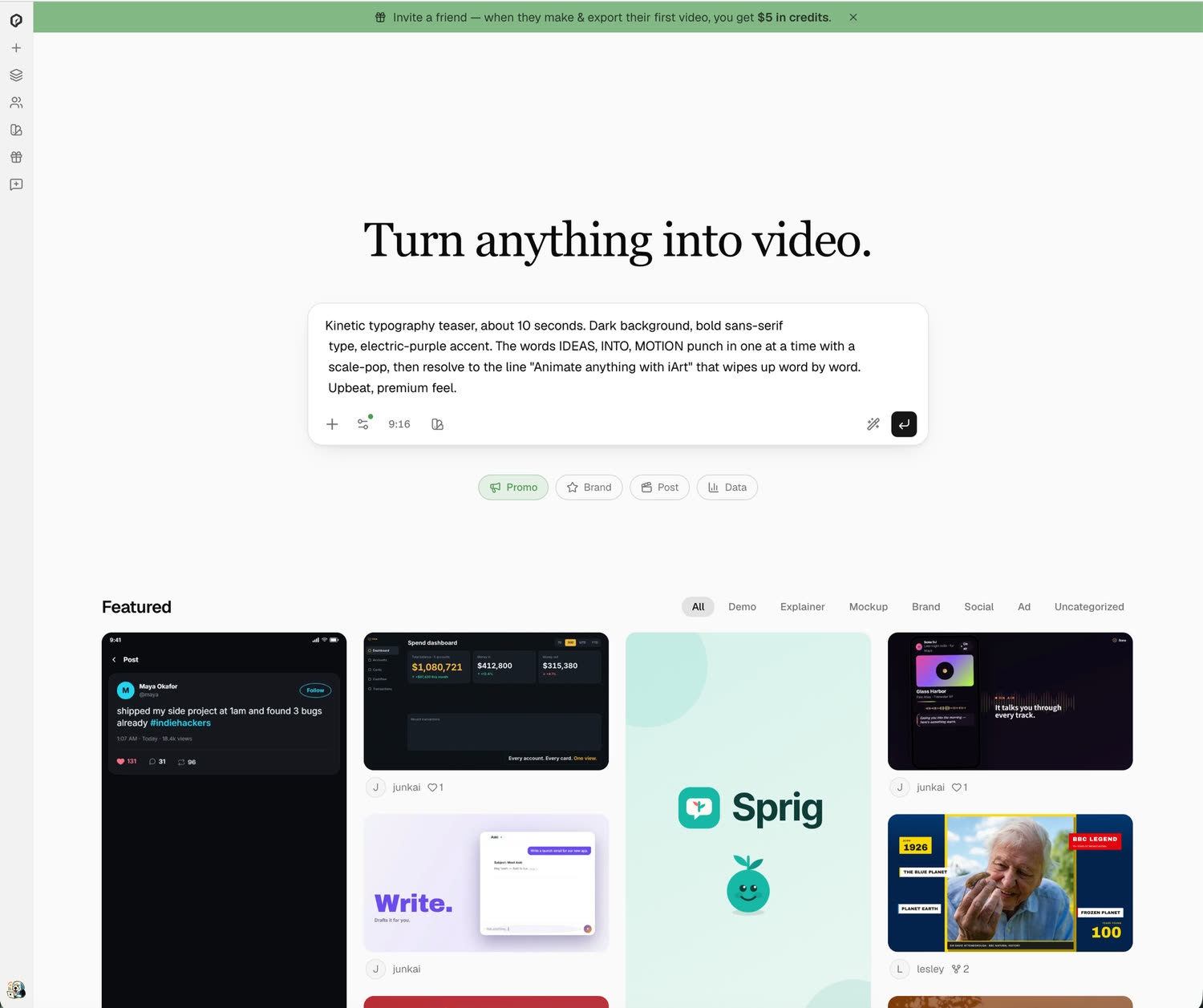
iArt's prompt box: you describe the animation you want — here, a kinetic typography teaser — and the AI generates it. No template to pick, no timeline to edit.
The clip above was generated from a prompt — word hits, scale emphasis, a resolve line — none of which is a CapCut preset. With iArt you can:
- Direct the motion in words. "Kinetic typography, each word punches in, last word in the accent color." The AI builds it; you didn't pick a preset.
- Refine by prompt. "Slower," "stagger by letter," "add a blur-in" — it adjusts without starting over.
- Add voice, music, and your footage. Layer in AI voiceover, a background track, or your own clips, then export an MP4 for an explainer or title sequence.
It's closer in spirit to After Effects than to a clip editor — see our After Effects alternative — but driven by a prompt instead of a timeline.
Which should you use?
This isn't either/or. The honest split:
- Use CapCut to edit and assemble footage, add captions, and beat-sync music for social clips — and when you want a huge library of templates and effects.
- Use iArt when the animation is the deliverable: kinetic typography, an explainer, animated titles, or data motion generated from a description and exported as MP4.
Plenty of people use both — generate the motion-graphics piece in iArt, then drop it into a CapCut edit alongside their footage.
Generate Motion Graphics from a Prompt
Describe the animation you want and get an editable, custom motion-graphics clip in minutes. Free to start.
Try iArt Free →FAQ
Is iArt a replacement for CapCut?
No — and it isn't trying to be. CapCut is a full video editor for cutting and assembling footage; iArt generates custom motion graphics from a prompt. If your work is editing clips, stay in CapCut. If you need bespoke animated text or motion graphics, iArt is purpose-built for that. Many people use both — generate in iArt, edit in CapCut.
Can CapCut make kinetic typography?
CapCut offers preset text animations and one-tap templates that give a kinetic look quickly. What it doesn't do is let you direct custom choreography — per-word timing, specific easing, sequenced emphasis. For that, an AI generator like iArt produces kinetic typography from a prompt.
Does iArt sync text to music like CapCut's Auto Beat Sync?
No. iArt can add a background music track to a generated video, but it does not beat-sync the animation to a song. CapCut's Auto Beat Sync is the tool for cutting clips to the beat. iArt's strength is generating the motion graphics themselves from a description.
Does iArt export GIF?
Not currently — iArt exports MP4. If you specifically need a looping GIF, an editor like CapCut or a dedicated GIF tool is the better fit today.
How much does iArt cost?
It's free to start: every new account gets $2 in credits on signup, no credit card needed, and a single animation costs a fraction of one credit. See pricing for plan details.