Best AI Product Video Generators in 2026: I Tested 7 With the Same Photo

Every "best AI product video generator" list I could find was written the same way: someone reads the pricing pages, paraphrases the feature bullets, and ranks the tools without generating a single video. So I did the opposite. I took one product photo — an amber-glass vitamin C serum labeled NOVA — and one brief, and I ran it through seven tools on their free plans — the same photo every time, and the same words wherever a tool gave me a prompt box (Runway's agent replaced it with a Q&A, ClipNova's form took the same words minus the length, which is a slider there, and Shhots and Zeely never let me reach one):
Cinematic 15-second product ad for this NOVA vitamin C serum. Premium skincare look, studio lighting, slow camera push-in, macro details on the dropper. Keep the bottle shape and label text exactly as in the photo. No avatars, no people.
Two things fell out of that test that no feature-list review will tell you.
First: not one free tier let me walk away with a usable product video. Six of the seven couldn't even finish one — they run out of free credits partway, or lock video rendering behind a paid plan entirely. The seventh, HeyGen, actually finished a video, but you can only watch it in the browser; downloading it costs money. So "free" across this whole category means "free to look," not "free to use."
Second, and more useful: every one of these tools is running the same handful of foundation video models underneath. Seedance, Kling, Veo, Nano Banana — the exact same names show up in tool after tool, and several of them say so right in their own UI. Two of them are Google's: Veo is Google DeepMind's video generation model (Google DeepMind), and Nano Banana is the image editing model Google DeepMind released in the Gemini app (Google). iArt, the tool I work on, is in the same boat — third-party models too, though it doesn't list the ones behind its product-video pipeline (more in its own section). Which means the thing you're actually choosing between is not some secret AI. The output ceiling is roughly the same everywhere. What differs is three things you can only see by actually trying them: how much friction stands between you and a first result, how faithfully the tool holds your product's real label, and what one finished video costs.
This review is organized around those three. Here's how each tool did, then a table, then how to pick.
They're all built on the same few models
Before the individual verdicts, the finding that reframes the whole category. I didn't have to reverse-engineer this; the tools disclose it themselves:
- Shhots lists "Seedance 2.5, Kling 3.0, Veo 3, Nano Banana Pro" on its own pricing page.
- HeyGen's video plan has a literal "Seedance ON/OFF" toggle, and its paywall upsell sells "Access to Seedance 2.0."
- Runway's agent picked "Seedance 2.5" as the model for the product video, and generated the hero still with "Nano Banana Pro."
- ClipNova advertises "Veo 3.1, Kling 3.0, Seedance 2.5, Pixverse v6."
- Zeely's onboarding funnel names "Nano Banana, Kling, Seedance, and more."
- InVideo generated its storyboard frames with "GPT Image 2."
iArt is no exception: it also runs on third-party foundation models, and it doesn't list the video models behind its product-video pipeline the way these tools do — so I'm not claiming any transparency high ground here. The point is simpler. When a tool markets "our AI," read it as "our workflow on top of shared models." That's the shape of the whole market right now, and it means model-quality marketing is mostly noise. Weigh the things below instead.
Same photo, three finished frames
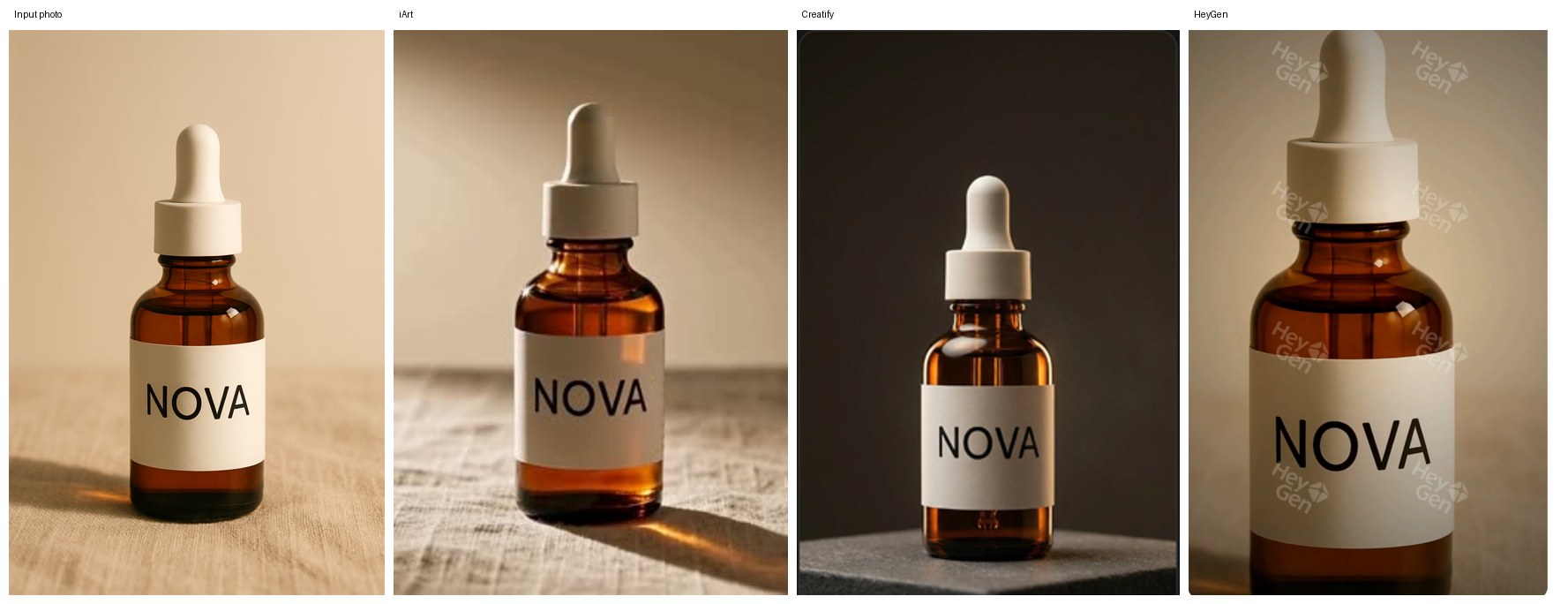
Left to right: my input photo, then iArt, Creatify, and HeyGen frames from the same photo and brief. All three hold the NOVA label and bottle. iArt kept the photo's own surface and light; Creatify and HeyGen moved the bottle into a new studio setup — which you prefer depends on whether you wanted your set or a new one. HeyGen's free output carries the tiled watermark shown.
The verdicts
Creatify — best brief adherence of the seven, stops one-third of the way in
Creatify's Creative Agent understood the brief better than anything else I tested. It locked the plan to exactly 3 scenes × 5 seconds = 15 seconds, 9:16, no people, no voiceover — and it ran a "visual description lock" pass on my photo (turning the bottle into an explicit written constraint) before generating. The three approved start frames kept the NOVA wordmark, cream cap, and bottle shape accurate in all three — the best product fidelity among the seven competitors — staged on a dark stone block under studio light, exactly as the brief invited.
Then the free plan (10 credits) rendered exactly one scene — a 4-second push-in — and stopped: "Session paused — out of credits. Subscribe to a paid plan to continue." So the free tier gets you a beautiful one-third of a video. Signup needs no card, but expect a bot-check on the way in. Paid starts at $39/mo for 100 credits.
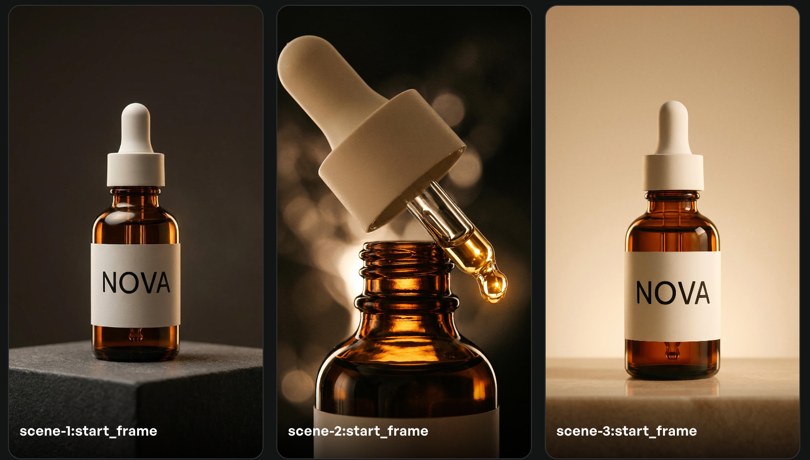
Creatify's three approved start frames — accurate label and bottle in all three. Only scene 1 went on to render before the free credits ran out.
The one scene Creatify's free plan rendered: a 4-second push-in, no watermark, label intact — screen-recorded from the in-app player. Scenes 2 and 3 never rendered.
HeyGen — the one competitor that finishes a free video, but it's watch-only
Of the seven competitors, HeyGen is the only one whose free plan produced a complete ad: its Video Agent finished the whole thing. But three catches. I asked for 15 seconds; the plan quietly became 12, and the final cut was 9 seconds. It added a voiceover and burned-in captions I never asked for ("Reveal your inner radiance," "Science-backed glow"). And when I clicked download, a paywall appeared — export is Creator ($29/mo) or Pro ($49/mo) only; the free output is watch-in-browser with a tiled HeyGen watermark. To its credit, the NOVA label stayed accurate in both scenes where the bottle appears (scene 2 is a dropper macro), and it honored "no people." Free tier: 3 videos/month, no card.
HeyGen's complete free-plan output for the same photo and brief — 9 seconds, tiled watermark, captions and voiceover added on its own. Screen-recorded from the in-app player (video only, audio not captured), because download is paid.
InVideo — the math doesn't allow a free video
InVideo's Agent Two ("Caleb") did the most elaborate pre-production of the seven: a full product reference sheet and a 6-panel storyboard, with good label fidelity, generated on GPT Image 2. Then rendering the actual video failed: "Need at least 110.4 credits for these generations, current credit balance: 13.7." The free plan is 50 credits per week, reset every Monday, no rollover — and a single 15-second render costs 110.4. That's more than two full weeks of the entire free allowance, which never accumulates. In other words, a free InVideo video isn't throttled; it's arithmetically impossible. (It also flashed a persistent "you are offline" error mid-run.)
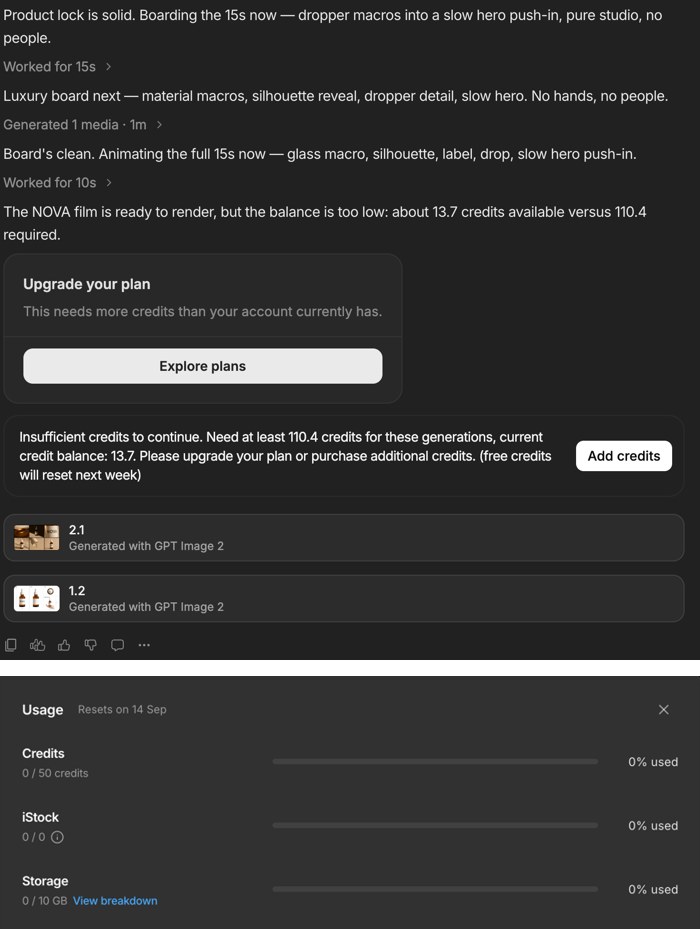
InVideo's render refusal (110.4 credits needed) and a fresh account's usage panel: 50 credits per week.
Runway — video is simply a paid feature
Runway's agent flow made a smart storyboard and a clean hero still (via Nano Banana Pro, at 2K, with the NOVA label well preserved). But it selected Seedance 2.5 for the video step and then showed "Upgrade to use this model" — on the free plan you get 125 one-time credits and image generation, but motion is paid. One oddity worth noting: the agent leaked its own internal reasoning into the chat as a visible message. Paid Standard is $12/mo.

Runway's agent produced the still on the left, then gated the video step — with Seedance 2.5 as the chosen model.
ClipNova — free credits can't reach a single video
ClipNova gives you 70 free credits. Its cheapest product-video setting (Base, 10s) costs 180, so you cannot render one. Image generation works — I got a clean hero shot with the NOVA label intact — but the free output is covered corner-to-corner in a tiled "ClipNova" watermark. One detail I found interesting: its onboarding's "How did you hear about us?" lists ChatGPT as the first option. Hobby plan is $19/mo, or $15/mo billed annually.
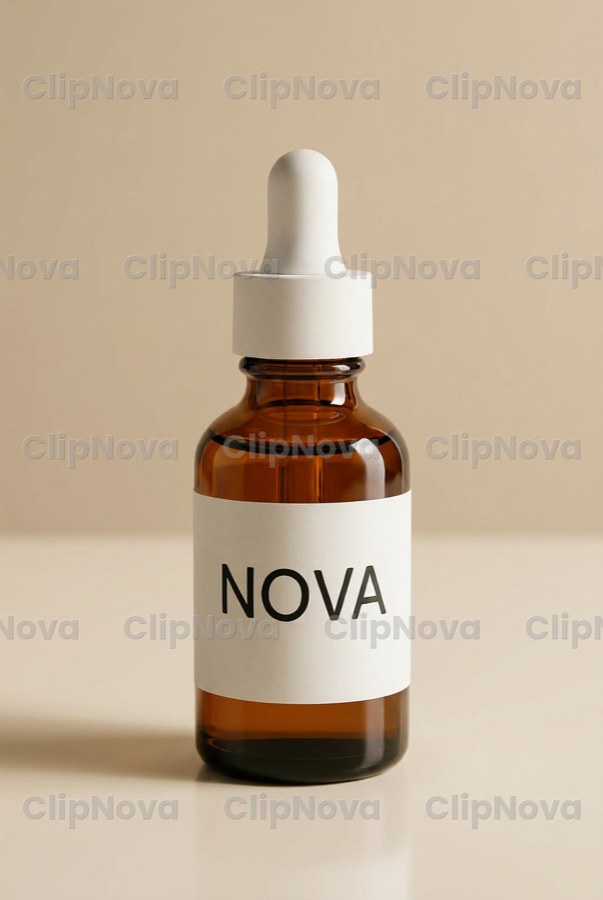
ClipNova's free image output: accurate label, wall-to-wall watermark.
Shhots — zero free credits
Shhots doesn't pretend. The free account has 0 credits, and the product-image upload button is locked behind a "Subscribe" overlay — you can't generate anything, image or video, without paying first. Starter is $19/month for about 3 ten-second videos. It's a clean product, aimed squarely at e-commerce brands, but there is no trial in any real sense.
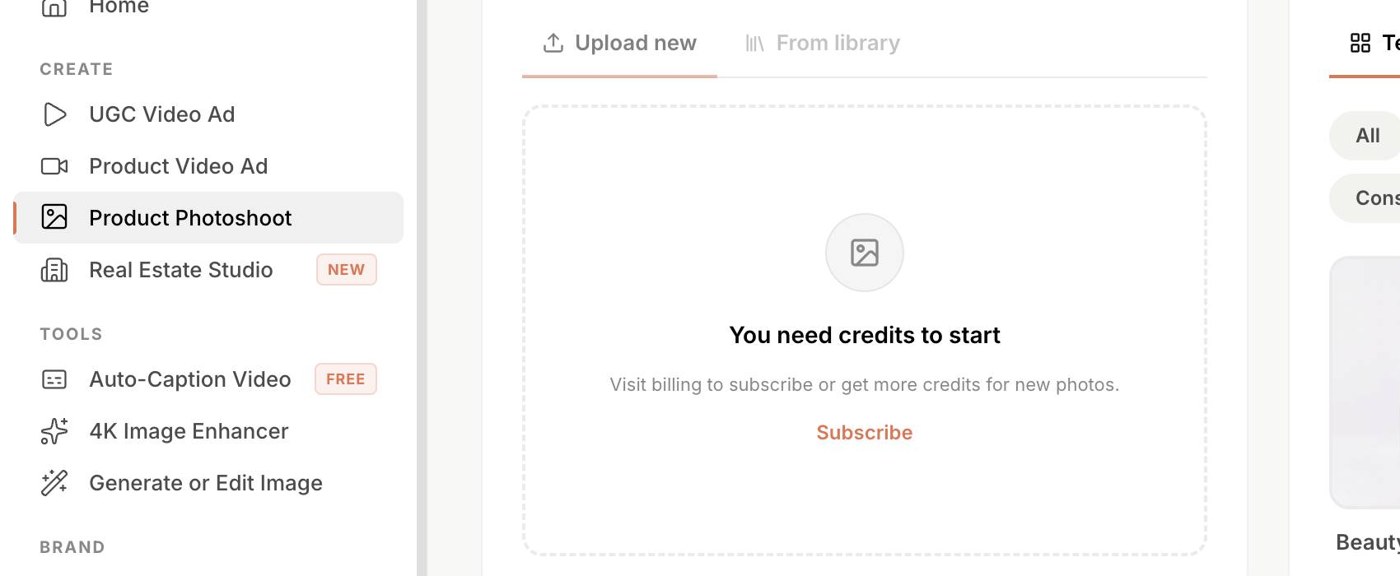
Shhots on a brand-new free account: the upload step itself is locked behind Subscribe.
Zeely — a 13-screen quiz, then a wall
Zeely made me answer thirteen onboarding screens — role, company size, industry, budget, marketing experience — dangling an "unlimited creation week" the whole way, before landing on a hard paywall: an intro offer of $19.95 for two weeks (list price $39.95, which is what it renews at), and no free generation at any point. It's a mobile-first, autoposting-oriented ad tool, and it may well work for its audience, but you cannot evaluate the output without a card.
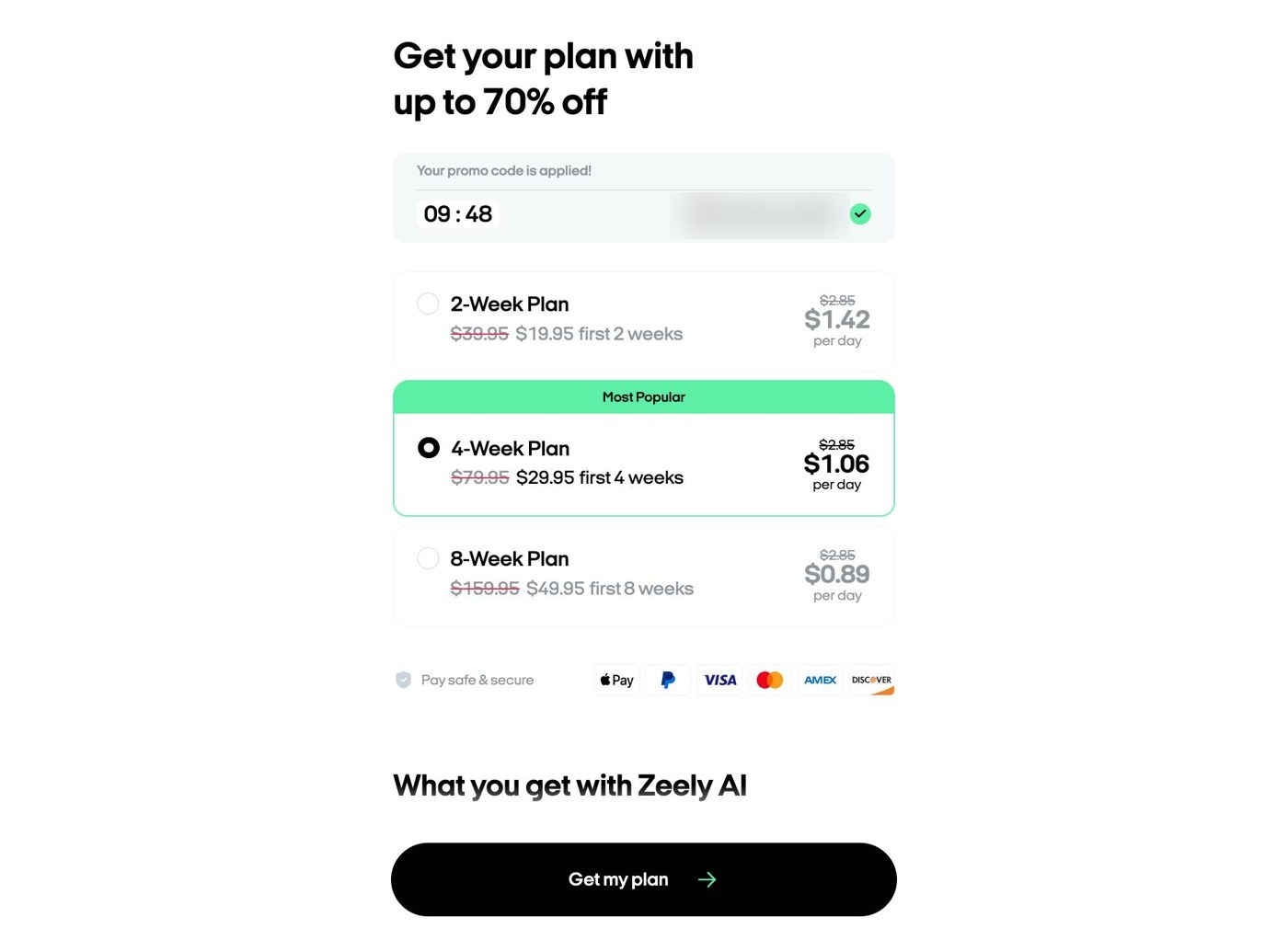
Where Zeely's 13-screen onboarding ends: a plan picker, no free option.
iArt — the tool I build (disclosure)
The same NOVA photo and the same brief on iArt — 15 seconds, landscape, first take, unedited. Rendered from a paid account ($1.20 of credit); the free-plan preview carries a watermark.
Since I work on iArt, take this section with the appropriate salt — but the same rules I applied to everyone apply here. iArt gives every account a $2 signup credit with no credit card, which is enough to generate a full video and watch it back, so you can judge the output before deciding. The clip above is the article's brief, run once: 15 seconds as asked, no voiceover added, the NOVA label and bottle intact. Unlike Creatify and HeyGen, it kept the photo's own linen surface and light instead of building a new set — which, strictly, is a miss on "studio lighting"; it's a plus only if the shot you already have is the one you want. It wasn't flawless: the dropper cap picked up a ribbed texture in the macro shots that the original doesn't have. Before rendering, its agent also warned me that the wordmark is redrawn by the engine rather than copied pixel-for-pixel — a limitation every generative pipeline shares, just stated up front. This 15-second landscape clip cost $1.20 of credit (credits are denominated in dollars); 10-second clips in my earlier runs cost $0.80. For scale, Shhots' $19 Starter works out to about $6.30 per 10-second video and ClipNova's $19 Hobby to about $3.80. The caveats, stated plainly because I won't hold competitors to a standard I dodge: exporting a finished MP4 is a paid feature here too, the free preview is watermarked, and iArt runs on the same class of third-party models as everyone else. What's different from five of the seven is the trial friction — a full watchable video with no card, which only HeyGen also offers — and, on my runs, the per-video cost.
The comparison
| Tool | What the free tier gets you | Card before first generation? | Card to export? | Held my product's label? | Cheapest paid |
|---|---|---|---|---|---|
| Creatify | ~⅓ of a video (1 scene, 4s) | No | Untested (credits ran out first) | Yes (re-staged) | $39/mo |
| HeyGen | A full video: generate free, watch in browser, pay to export | No | Yes | Yes (re-staged) | $29/mo |
| InVideo | Storyboard only (render needs 2+ weeks of credits) | No | Yes | Yes (stills) | $200/yr (≈$17/mo, billed yearly) |
| Runway | A hero image; video is paid | No | Yes | Yes (still) | $12/mo |
| ClipNova | A watermarked image; video out of reach | No | Yes | Yes (still) | $19/mo |
| Shhots | Nothing — 0 credits | Yes | Yes | Couldn't test | $19/mo |
| Zeely | Nothing — quiz then paywall | Yes | Yes | Couldn't test | $19.95 intro / $39.95 |
| iArt (mine) | A full video: generate free, watch in browser, pay to export | No | Yes | Yes (kept photo's set) | $20/mo |
Pricing verified September 2026 from each tool's own pricing page or in-app plan picker (Creatify, HeyGen, InVideo, Runway, ClipNova, Shhots, Zeely, iArt); free-tier behavior is what I observed firsthand on the dates of testing (September 7–10, 2026) and can change.
How to actually choose
Since the underlying models are shared, pick on fit, not on "which AI is best":
- You want to judge the output before paying: only two tools let you generate and watch a complete result without paying — HeyGen and iArt — and both charge to export it. Everyone else makes you pay before you can even see a finished video.
- Your real product must appear accurately: attach a photo and favor the tools that held the label here — iArt, Creatify, and HeyGen all did; (iArt kept the photo's own set; the other two re-staged.) A tool that invents a plausible-but-wrong bottle is useless for a real SKU. (For the mechanics of writing prompts that preserve a product, see my tested prompt recipes.)
- You're price-sensitive on volume: compare cost per video, not headline monthly price. A $19 plan that yields three 10-second clips is more expensive per video than it looks.
- You need broadcast avatars or talking-head UGC: that's HeyGen's actual home turf, and a different job than the cinematic product spot I was testing.
The one thing I'd stop doing is choosing a product-video tool by its model marketing. They're mostly the same models underneath; pick on what you can actually verify with your own photo.
FAQ
What's the best free AI product video generator?
None of the seven competitors I tested lets you export a finished product video for free. HeyGen is the only competitor that lets you generate and watch a complete video without paying, but downloading it requires a paid plan. If your goal is just to evaluate output quality before buying, HeyGen and iArt both let you see a full result; the rest require payment before you reach a finished video.
Do these tools use their own AI models?
Mostly no. Across the tools I tested, the underlying video models are a shared set — Seedance, Kling, Veo, Nano Banana — and several tools name them in their own interfaces or pricing pages. Differences in output come more from the workflow, prompt handling, and rendering pipeline than from a proprietary model.
Can AI keep my actual product looking correct in the video?
Yes, if you attach a photo and the tool supports image input. In this test, iArt, Creatify, and HeyGen all preserved the product's label and bottle shape from the same photo and brief. iArt kept the photo's original surface and lighting, while the other two re-staged the bottle in a new studio setup. Without a photo, these engines invent a plausible product that won't match your real SKU.
How much does one AI product video actually cost?
On paid plans, the honest unit is cost per video, not the monthly price. Credit-based plans often translate to only a few finished videos per month — for example, a $19 plan that yields roughly three 10-second clips. In my own runs on iArt, a 10-second 768p clip cost $0.80 of credit; other tools vary, so divide monthly credits by what one render consumes before comparing.
Why can't I download my free video from some of these tools?
Export is a common paywall in this category. Two of the tools here (HeyGen and iArt) let you generate and preview a full video on a free plan but gate the MP4 download — and watermark-free output — behind a subscription; the others don't get you to a finished video at all without paying. So factor export into the real cost, not just generation.
Try it on your own product
The fastest way to see any of this for yourself is to run your own product photo through the same brief. Make a cinematic product video on iArt with a $2 signup credit and no card, then decide with a real result in front of you rather than a feature list.