AI Product Video Prompts: 8 Recipes I Tested (With Every Video)

Most "AI video prompt" lists are written backwards: someone collects prompts that look impressive, publishes them, and never runs a single one. This one works the other way. I wrote eight product-video prompt recipes, ran every one of them through iArt's cinematic product video maker, and embedded the exact clip each prompt produced — unedited, first take unless noted. Each 10-second clip cost $0.80 and rendered in one to five minutes.
Two of the recipes also use a product photo as input, because that changes everything about the result — there's a back-to-back comparison below where the same prompt runs with and without a photo, and you can see the difference in ten seconds.
The pattern behind all eight
After going through a public library of 200+ published prompts and testing my own, the recipes that work share one shape. A working product-video prompt is a shot list, not a mood board:
- Format first. Aspect ratio and length in the first sentence: "9:16 vertical, 10 seconds." The ratio is a platform spec, not a taste call: TikTok's ad specifications recommend 9:16 vertical for in-feed video (TikTok for Business).
- Light before objects. Name the lighting and palette before describing what happens — "dark studio, single warm amber key light" sets more of the final look than anything else.
- Timecoded beats. Break the clip into 2–4 second windows: "0–3s: macro on the bottle. 3–6s: light sweep reveal." Engines follow this with surprising precision.
- One explicit camera move per beat. Dolly-in, orbit, punch-in — name it. "Cinematic camera work" gets you a random one.
- Big type only. Give the exact words you want on screen, keep them short, and ban everything else: headline text renders crisp, but small decorative text comes out garbled. Every recipe here ends with a negative constraint like "no small print anywhere."
- Audio is part of the shot. One line — "rain ambience, one deep clock-tick on the final cut" — and the engine generates it in the same pass.
- A photo pins identity; the prompt directs the film. If the video must show your product, attach a photo and say what must be preserved. Without one, the engine invents a plausible product (recipe 2b shows exactly what that looks like).
Every prompt below is copy-paste ready. They're written for iArt's product video generator, but the structure carries to any current text-to-video engine.
Recipe 1 — Luxury hero shot (perfume)
Luxury perfume commercial, 16:9, 10 seconds. Dark studio, single warm amber key light. 0-3s: extreme macro on the cut-glass facets of a perfume bottle, slow dolly-in, light refracting. 3-6s: a slow light sweep reveals the full bottle silhouette on black. 6-10s: bottle centered and still, big bold serif headline "MIDNIGHT AMBER" fades in above it, smaller line "EAU DE PARFUM" below. Fine amber dust particles drift through the beam. Audio: low ambient hum, one soft chime when the title lands. Do not put any text on the bottle label, no human hands, no small print anywhere — only the two title lines.
Why it works: the whole first half is light on glass, which engines render beautifully, and the product only has to hold still in the final beat. Note the bottle label is deliberately blank — asked for, and delivered.
Recipe 2 — Your actual product, from a photo (watch)
This is the recipe for sellers. The input was this photo:
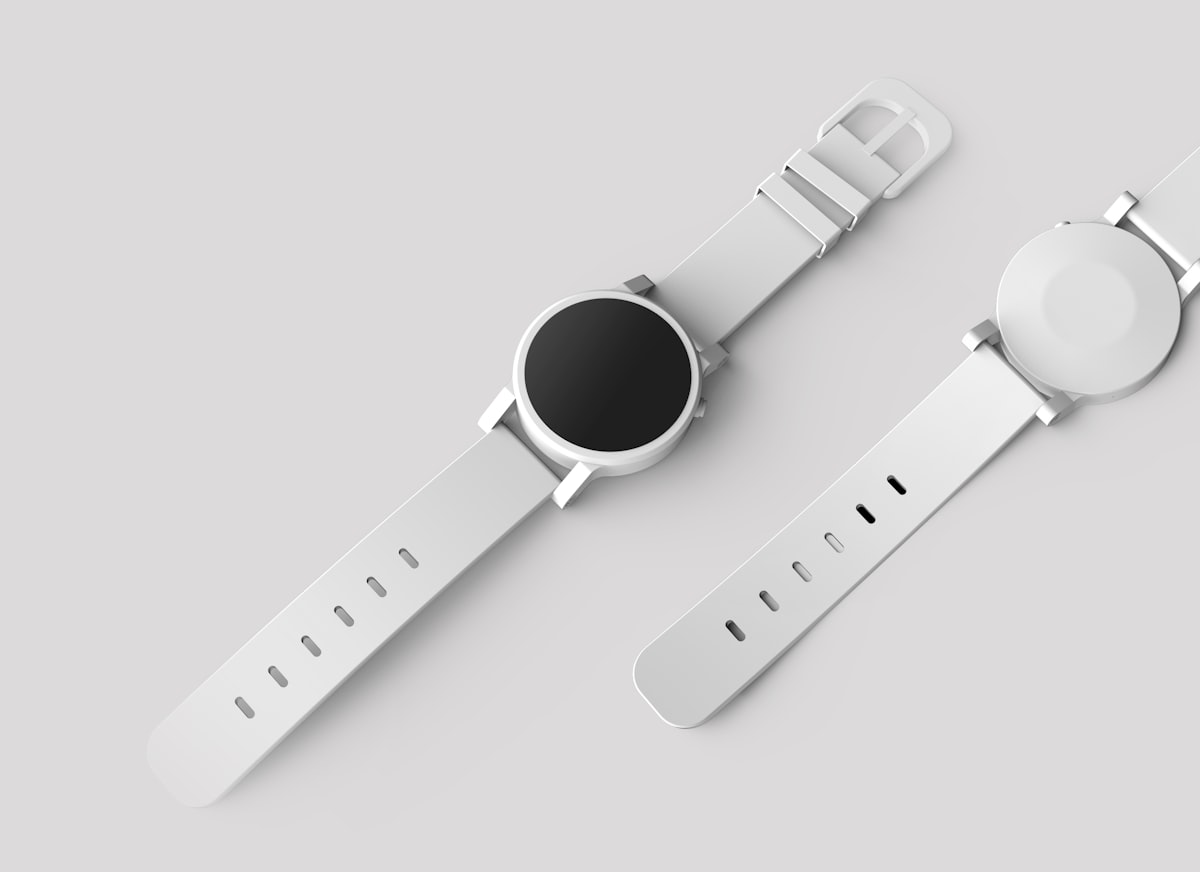
Cinematic watch commercial, 9:16 vertical, 10 seconds. Use my attached photo as the product — preserve the watch exactly: dial layout, hands, case shape, strap material. Do not redraw or invent dial markings. 0-3s: the watch lies on wet black slate, sparse rain droplets, one hard rim light carving the case edge. 3-7s: slow 180-degree orbit around the watch, ending in a macro push-in on the dial as a droplet slides off the crystal. 7-10s: cut to the watch upright and centered, big bold sans-serif type above it: "TIME. OWNED." — nothing else on screen. Audio: rain ambience, one deep clock-tick on the final cut.
The case shape, the blank black dial, the white strap with its oval holes — all carried over from the photo into a scene that never existed. The one line doing the heavy lifting is "preserve the watch exactly" plus naming the parts that matter. The agent even flagged, before filming, that the dial in my photo had no markings and promised not to invent any.
Recipe 2b — The same prompt, without the photo
To show what the photo is actually doing, I ran the identical prompt with the photo removed (describing the watch in words instead):
Still a handsome commercial — but it's a watch, not the watch: cream instead of white, a chunkier case, different proportions. Without a reference image you get a plausible product; with one you get yours. That's the whole difference between a brand-film prompt and a product video from a photo.
Recipe 3 — Quiet-luxury skincare, label preserved
Same photo-first workflow on a skincare bottle (a sample product shot with a fictional brand, so the label itself is part of the test):
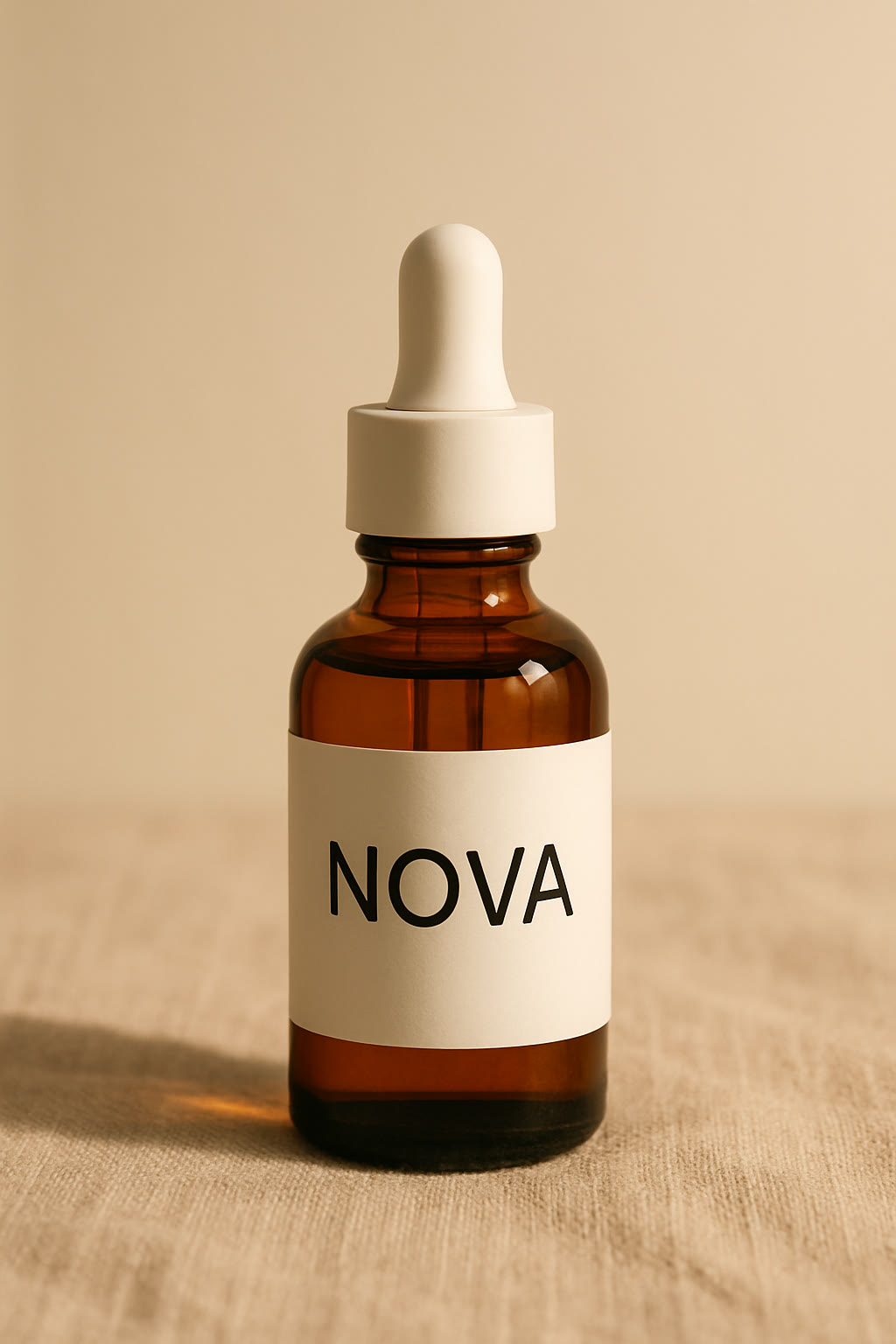
Quiet-luxury skincare commercial, 9:16 vertical, 10 seconds. Use my attached photo as the product — preserve the amber glass bottle, white dropper cap and the NOVA label exactly; do not redraw the label or add any text to it. 0-3s: golden morning light sweeps across beige linen, the bottle stands in soft shadow that slowly lifts. 3-6s: macro — a single amber drop falls from the dropper in slow motion, catching the light, landing on a glass surface and blooming outward. 6-10s: the bottle hero-center in full warm light, one big elegant serif line fades in beside it: "SKIN, SIMPLIFIED." Audio: soft room tone, one gentle piano note as the title lands. Negative: no skin or faces, no extra bottles, no small text beyond the label.
The four-letter NOVA label survived intact. That's the honest boundary worth knowing: a short, bold wordmark usually carries over cleanly; fine print never does. The engine re-renders lettering rather than pasting pixels, so the more label text your product has, the more you should plan a macro beat that keeps it readable — or keep the label out of the tightest close-ups.
Recipe 4 — UGC-style testimonial
UGC-style testimonial clip, 9:16 vertical, 10 seconds, shot like a real phone video, slightly handheld. A woman in her late 20s sits by a bright window at home, morning light, holding a small unbranded amber dropper bottle. She looks into the camera and says naturally: "Okay — I did not expect this to actually work." Then a quick punch-in on the bottle in her hand, her thumb over the label. Native audio: her voice, faint room tone, a bird outside. Style: authentic phone footage, imperfect framing, natural skin texture. Negative: no studio lighting, no on-screen text, no captions, no brand names spoken or shown.
The opposite register from everything above: here you prompt against polish. The load-bearing phrases are "shot like a real phone video," the spoken line in quotes (the engine generates the voice with the footage), and the negative list banning studio light and captions. If you're using an AI person in ads, disclose it where your platform requires — synthetic testimonials presented as real customers will burn you. In the US, the FTC's 2024 rule bans testimonials that misrepresent they come from someone who does not exist, AI-generated ones included (FTC).
Recipe 5 — Minimalist tech film (earbuds)
Minimalist tech product film for wireless earbuds, 16:9, 10 seconds, shot like a product-design film on a white cyclorama. 0-3s: one matte black earbud rotates slowly on an invisible turntable, macro, soft studio light, shallow depth of field. 3-6s: the charging case opens toward camera and both earbuds rise out and drift apart in a clean exploded-view arrangement, floating parts perfectly aligned. 6-10s: everything glides back together, case closes, and one big bold black sans-serif line lands beside it: "HEAR EVERYTHING." Audio: soft whoosh on the drift, one deep click when the case closes. No spec sheets, no small feature labels, no other text anywhere — only that one headline.
"Exploded view" is the highest-value phrase in tech-product prompting — it reads as engineering competence and engines execute it cleanly. The temptation to add feature callouts is exactly what the negative constraint exists to stop: those small labels are where garbled text sneaks in.
Recipe 6 — Fashion campaign (golden hour)
Fashion campaign film, 9:16 vertical, 10 seconds, desert at golden hour. 0-3s: close on beige trench-coat fabric rippling in wind, strongly backlit, sand drifting past. 3-7s: a model walks slowly toward camera across a dune ridge, coat flaring behind, camera dollies back at matching speed, low sun flaring at the frame edge. 7-10s: the model stops as a silhouette against the sun, coat still moving, big thin elegant serif type lands top of frame: "FALL / 26" — nothing else. Audio: wind, fabric movement, one distant swell of strings. Negative: no face close-ups, no brand logos, no other text.
Fabric in wind is to fashion what light-on-glass is to fragrance: the material does the acting. "No face close-ups" isn't just taste — AI faces drift under scrutiny, and a silhouette ending sidesteps the problem entirely while looking more like a real campaign.
Recipe 7 — Typography-led launch teaser
Typography-led app launch teaser, 16:9, 12 seconds, black background, huge bold white sans-serif type only. 0-2s: the words "EVERY IDEA" slam onto screen one word per beat with a deep bass hit each. 2-4s: they cut away and "DESERVES MOTION." slams in the same way. 4-8s: a sleek smartphone floats up from the bottom through the words, screen glowing with soft abstract color gradients, gentle camera drift around it. 8-12s: phone settles center, final line lands beneath it: "LAUNCH DAY 10.01" in the same huge bold type. Audio: minimal electronic pulse, bass hits synced to each word slam. Strict rule: only these three text moments, no small text, no UI details readable on the phone screen, no logos.
Three text moments, every word specified, everything else banned. "No UI details readable on the phone screen" matters: ask for a glowing gradient instead of an interface and there's nothing on the screen to come out wrong. For heavier kinetic typography work — long copy, beat-synced word choreography — a dedicated typography pipeline beats a video engine.
Recipe 8 — The CGI installation stunt
CGI-style outdoor installation ad, 9:16 vertical, 10 seconds, photoreal. A generic white minimalist running sneaker, three meters tall with no logos, stands in the middle of a city crosswalk in morning light like a public art installation. 0-3s: street level — pedestrians walk past and film it with phones, the giant sneaker towers over them. 3-7s: a drone shot orbits down around the sneaker, sunlight flares between buildings, tiny reflections in office windows. 7-10s: wide top-down as the crosswalk stripes line up under the shoe, big bold headline lands across the sky: "STEP BIGGER." Audio: city ambience, one cinematic riser into the title. Negative: no readable faces, no car brands, no logos anywhere, no text except the headline.
The "impossible object in a real street" format — the CGI ad — used to be a five-figure VFX line item. The trick in prompting it is scale anchoring: pedestrians filming it with phones gives the shot a believable size reference and makes the fakery read as an installation, not an error.
What fails, honestly
- Small text garbles. Big headlines render crisp; fine print, spec labels and long lines come out as alphabet soup. Design your prompt so nothing small needs to be legible.
- Labels are re-rendered, not pasted. Even with a photo, lettering on your product is redrawn by the engine. A short bold wordmark like NOVA survives; dense label copy won't be character-exact. The agent warned me about this before filming — believe it.
- No photo means an invented product. Recipe 2b is the proof. Fine for brand films and teasers; wrong for showing buyers the thing they'll receive.
- Negative constraints have limits. The recipe 8 sneaker was prompted with "no logos anywhere" — and still grew a faint logo-like curve on its side, right where sneaker brands put theirs, because that's what the engine thinks sneakers look like. Category archetypes leak back in; check your output before you ship it.
- First takes aren't guaranteed. Every clip on this page is a first take, but treat that as a good run, not a promise — budget for a reshoot or two on a real campaign.
How to run these prompts
- Open iArt's cinematic product video maker — you can start on the free tier.
- If the video must show your actual product, add your product photos (the upload form takes up to 5); otherwise skip straight to the prompt.
- Paste a recipe and swap in your product, your headline words, and your format (9:16 for Reels/TikTok, 16:9 for YouTube and landing pages).
- Review the shot plan the agent proposes, approve, and the clip renders in about one to five minutes. Exporting the file requires a paid plan.
FAQ
Do these prompts only work in iArt?
The structure — format first, lighting first, timecoded beats, explicit camera moves, big type only, negative constraints — transfers to any modern text-to-video engine. The results shown here are what iArt produced, and the photo-preservation workflow in recipes 2 and 3 is specific to tools that accept reference images.
How much did each video cost?
Every 10-second clip on this page cost $0.80 to generate at 768p; the 12-second typography teaser cost $0.96. Generating is metered per second of output, and exporting requires a paid plan.
Can I keep my product's label readable?
A short, bold wordmark usually carries over from your photo cleanly — the NOVA label in recipe 3 survived intact. Dense or small label text is re-rendered by the engine and won't be character-exact, so keep fine print out of close-ups or plan around it.
What aspect ratio should product videos use?
Match the placement: 9:16 for TikTok, Reels and Shorts, 16:9 for YouTube pre-roll and website heroes, 1:1 for feed placements. YouTube's own definition of a Short is a vertical video of up to 3 minutes (YouTube Help). State it in the first sentence of the prompt — engines honor it, and composition changes with it.
How long should an AI product video be?
Ten seconds is the sweet spot for a single-product ad: three beats, one headline, done. Going longer only pays off when you have real structure to fill it — more beats, not slower ones.
Try them on your product
Pick the recipe closest to your category, swap in your product photo and your three words, and run it: make a cinematic product video with a free account. If you want the deeper walkthrough of the photo-first workflow, the companion piece is Cinematic product video from a photo. And if you want to see how iArt stacks up against six other tools on the same photo, read the tested comparison of AI product video generators.