Batch Video Generator
Paste a list.
Get a video for every line.
One request becomes a set of motion graphics videos: a series, a name card per guest, a chart per number.
iArt plans each video, makes them at the same time, and lets you change one or all of them in a sentence.
Opens iArt with your list. You see the plan before anything is made.
Pro, Ultra and Max plans · up to 15 videos per batch
What is a batch video generator?
Many videos,
one request.
A batch video generator makes a set of videos from one input instead of one video at a time. In iArt you paste a list, describe a series ("5 tips on writing emails") or attach a spreadsheet, and each line, tip or row becomes its own motion graphics video.
It is not one template with the words swapped. iArt first plans the batch: it writes a full brief for every video, with its own visual idea, so a set of six explainers looks like a series without six identical films. You read the plan, change it in the chat (add one, drop one, make them shorter), and only then make them.
The videos are made at the same time on iArt's servers, so you can close the tab. When they are done you can change one, or tell iArt to change them all in one sentence, and download each as an MP4.
A real batch
One list in, six videos out.
We pasted the request below into iArt's Batch, read the plan and pressed Make. Nothing was edited or made again: these are the six videos it returned.
1 · The request, pasted as is
An 8-second kinetic-type explainer for my personal-finance YouTube channel, one per term. Each shows the term, a one-line plain-English definition, and one simple visual that makes the idea click:
- Compound interest
- Inflation
- Emergency fund
- Index fund
- Credit score
- Opportunity cost
Open this request in Batch →2 · The plan iArt wrote
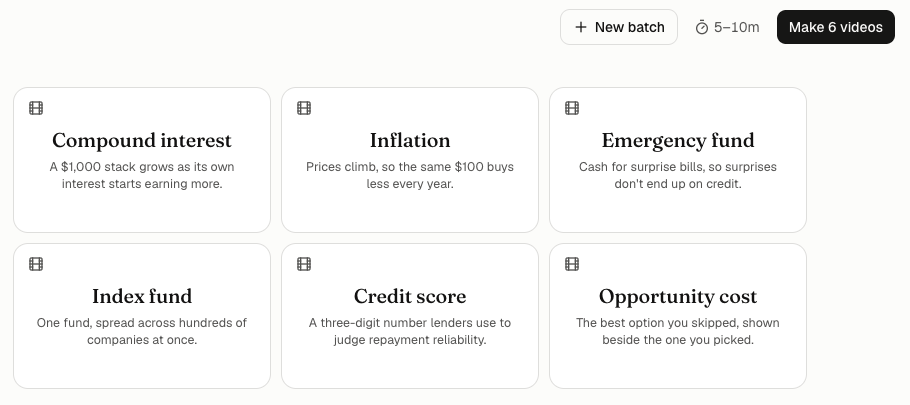
Each card is one video with its own idea. You can change the plan in the chat before you make anything.
3 · The six videos (playing at the top of this page)
| Video | iArt's plan for it | Make → done |
|---|---|---|
| Compound interest | A $1,000 stack grows as its own interest starts earning more. | 3.2 min |
| Inflation | Prices climb, so the same $100 buys less every year. | 2.9 min |
| Emergency fund | Cash for surprise bills, so surprises don't end up on credit. | 3.8 min |
| Index fund | One fund, spread across hundreds of companies at once. | 2.2 min |
| Credit score | A three-digit number lenders use to judge repayment reliability. | 2 min |
| Opportunity cost | The best option you skipped, shown beside the one you picked. | 3.2 min |
- Videos from one request
- 6
- From Make to the last video done
- 3.8 min
- Credits used (Sonnet 5.5, the default model)
- $5.40
Made on 2026-11-17 on the Ultra plan, with the default model and no voice-over. Each video was made once; none needed a retry. Credits depend on the model and the length: a cheaper model costs less.
How it works
From a list to finished videos
01
Paste a list or describe the set
Turn on Batch in iArt and paste one video per line, describe a series, or attach a CSV or a document. Add your logo or screenshots if every video should use them.
02
Read and change the plan
iArt writes a brief for every video and shows them as cards. Change the plan in the chat: add a video, drop one, make them shorter or switch the format.
03
Make them all at once
Press Make. The videos are made at the same time on iArt's servers, so you can close the tab and come back.
04
Change one or all, then download
Open a video to change it in words, or change the whole set in one sentence. Download each as an MP4: 720p right away, or 1080p or 4K rendered again on your plan.
What you can give it
A list, a sentence or a spreadsheet
A list, one video per line
Terms, guests, products, quotes, tips: each line becomes a video. Put shared instructions (length, format, look) above the list.
A sentence that describes a series
"5 kinetic-type videos, one tip each, on writing better emails." iArt splits it into the videos and writes each one.
A CSV, one video per row
Attach a spreadsheet saved as CSV and say what each row should become, for example a name card per guest from a name and title column.
Documents, images and your logo
Attach a PDF, a text file, screenshots or a logo. iArt decides which files each video needs; a logo or brand files go into every one.
What people make in batches
A series for a faceless channel
One explainer per term, fact or chapter, all in the same style, ready for a week of uploads.
More on this kind of video →Name cards for every guest
A lower-third per speaker or podcast guest from a list or a spreadsheet of names and roles.
More on this kind of video →A chart for every number
Each figure from a report or a launch becomes its own short animated chart.
More on this kind of video →A tip or quote series
Kinetic typography, one tip or quote per video, sized for Reels, Shorts or TikTok.
More on this kind of video →A video per feature
A short launch video for each new feature, with your logo and screenshots in every one.
More on this kind of video →Story or chat variations
Several versions of the same idea, such as text message stories with different endings, to test which one works.
More on this kind of video →
Plans and limits
How many videos at once
| Plan | Videos per batch |
|---|---|
| Pro | 3 |
| Ultra | 6 |
| Max | 15 |
- –Batch is in beta and part of the Pro, Ultra and Max plans. On the free plan you can write and plan a batch, and your list is kept while you upgrade.
- –Videos use your credits at the same prices as videos made one at a time. Before you make a batch, iArt warns you if your credit may not cover all of it.
- –The number per batch is also the number of videos you can have in progress at once, shared with the iArt API.
- –Brand, voice, music, model and aspect ratio are set once for the batch and apply to every video in it.
- –Videos are made on iArt's servers: closing the tab does not stop them. Each video is also saved as its own project.
Need hundreds of videos from code or an automation? Use the iArt MCP server from Claude or ChatGPT, or the REST API.
How do I make many videos at once with AI?
In iArt, turn on Batch, paste a list with one video per line (or describe a series, or attach a CSV), read the plan iArt writes, and press Make. The videos are made at the same time; in our test, six 8-second explainers were all done 3.8 minutes after Make.
Can I turn a spreadsheet into videos?
Yes. Save the sheet as CSV, attach it in Batch and say what each row should become, for example "a name card for each guest". iArt plans one video per row and uses that row's values.
How many videos can I make in one batch?
Up to 3 on Pro, 6 on Ultra and 15 on Max. That number is also how many videos you can have in progress at once, together with the iArt API.
Is the batch video generator free?
You can plan a batch on the free plan, but making it needs Pro, Ultra or Max. Videos use credits at the same prices as single videos.
Do all the videos look the same?
They share the format, brand and settings you choose, but iArt writes a separate brief for each, so every video gets its own visual idea. Ask for a stricter template in the request if you want them nearly identical.
Can I change the videos after they are made?
Yes. Open one video and say what to change, or send one message that changes the whole set. Each change is made again and uses credits.
Is there a bulk video API?
Yes. The same videos can be made from code with the iArt REST API, or from Claude and ChatGPT with the iArt MCP server. They share the per-plan limit on videos in progress.
Your next ten videos
start as one list.
Paste it below. You see the plan before anything is made.
Opens iArt with your list. You see the plan before anything is made.