How to Make Faceless YouTube Channel Videos

Faceless YouTube videos carry a story with narration, motion graphics, and visuals instead of a person on camera. You never show your face or even record your own voice — the whole video is built from a script. This guide is about the part that actually takes the work: making the video itself. (Registering the channel and turning on monetization are separate steps outside the scope here — and outside what any video tool does for you.)
Below is a practical, repeatable workflow for producing faceless channel videos with AI, using iArt for the heavy lifting — narration, animated motion graphics, and visuals — so a written script becomes a finished MP4. The same process works whether you're making a single explainer or building a back catalogue of weekly uploads.
What a faceless video is actually made of
Most successful faceless channel formats — explainers, "documentary"-style deep dives, top-10 lists, history and educational pieces — share the same building blocks:
- A spoken script read by a voiceover (not you on camera).
- Motion graphics — animated text, charts, and transitions that hold attention and reinforce each point.
- Supporting visuals — AI-generated images or your own uploaded images and footage.
- Length — many faceless channels run long, 8–20 minute videos, to maximize watch time.
The challenge is assembling all of that without an editor, a camera, or motion-design skills. Done by hand in After Effects or Premiere, a single 10-minute explainer can eat 8 to 20 hours — scripting, recording or sourcing a voiceover, finding or building every visual, then editing it all to the narration. That bottleneck is exactly the gap AI fills.
Faceless video formats that work
Before you make anything, pick a format that suits narration plus motion graphics rather than a presenter. These are the faceless formats that consistently hold attention — and double as channel ideas if you're still deciding:
| Format | What it is | Why it works without a face |
|---|---|---|
| Explainer | "How X works" / "Why Y happened" | The idea is the star; animated diagrams carry it better than a talking head. |
| Top-10 / list | Ranked countdowns and roundups | Each entry is a clean visual card — pure motion-graphics territory. |
| History & documentary | Narrated deep dives on events or people | Maps, timelines, and archival-style imagery do the storytelling. |
| Educational / how-to | Tutorials and concept breakdowns | Step-by-step text and charts are clearer than a person describing them. |
| Data & finance | Market, stats, and "by the numbers" videos | Animated charts and counters are the content. |
| Story / mystery | Unsolved cases, "what happened to…" | Mood, kinetic text, and imagery build tension without a host. |
How to make a faceless YouTube video with AI
1. Pick a topic and write the script
Choose a topic with a clear narrative — "why X happened," "the rise and fall of Y," "5 things about Z." Narration runs at roughly 140 words per minute, so a 10-minute video is about a 1,400-word script; plan length accordingly. Write it yourself or draft it with a writing assistant, then tighten it: a strong first 15 seconds, one idea per beat, and a clear takeaway. The script is your single source of truth — everything visual follows from it.
2. Turn the script into a narrated video clip
Paste a section of your script (roughly a 60–100 second beat) into iArt as a prompt. It generates an animated clip from that text — adding AI voiceover (TTS), motion graphics, and matching visuals — and you can drop in your own images where you want a specific shot. Because narration is generated, you never record your voice. Work scene by scene so each beat looks deliberate rather than a wall of stock footage.
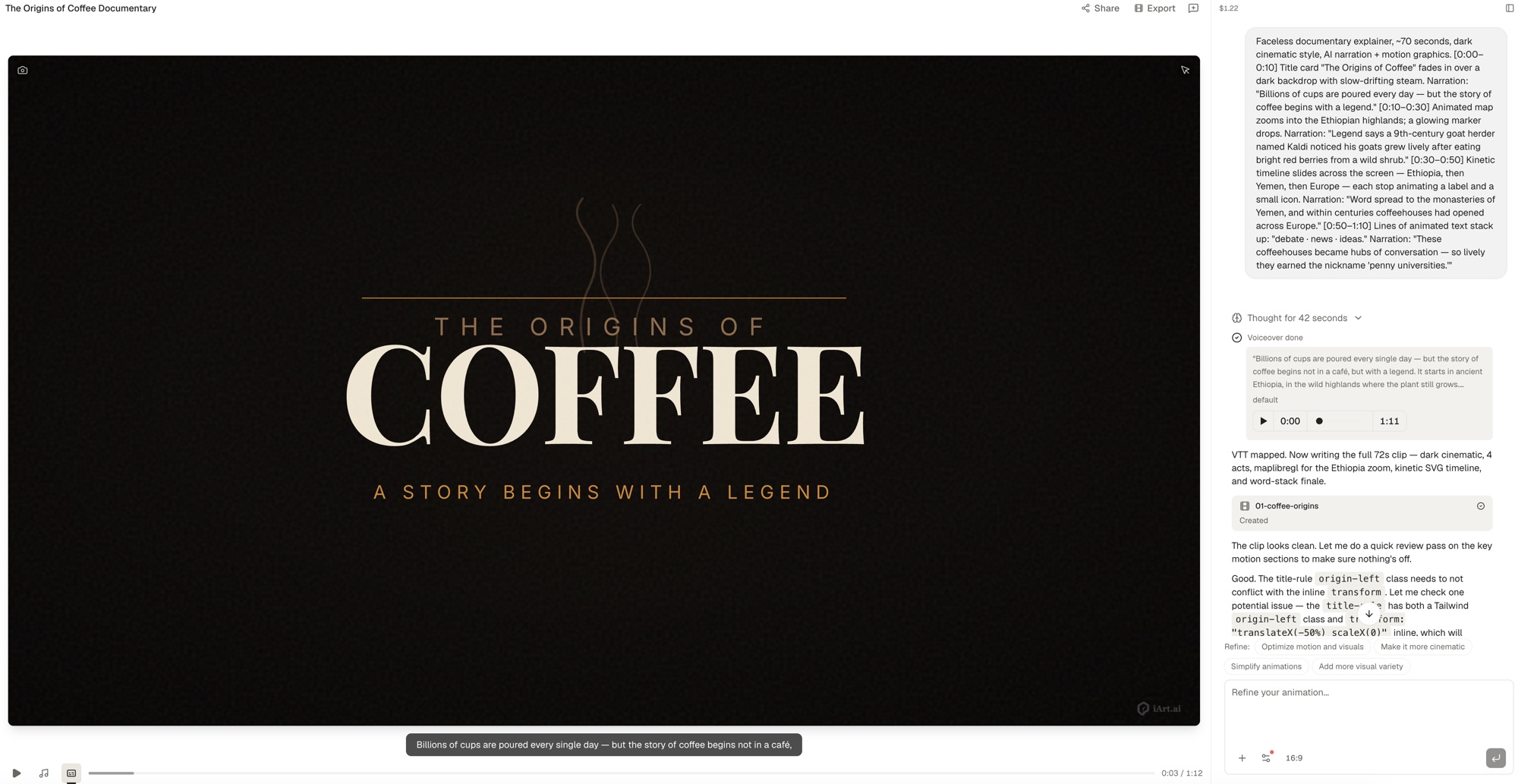
3. Assemble the full-length video
Faceless videos are long, so build them clip by clip and then stitch the beats together into one continuous video. iArt produces long-form this way — generating each roughly 60–100 second segment and concatenating them — so a 10-minute piece is around 8 to 12 stitched beats, and the same approach scales from short clips up to videos of 60 minutes or more. You assemble a multi-minute narrated piece without ever opening a timeline editor.
4. Export and publish
Export the finished video as an MP4 — available on a paid plan — and upload it to your channel as you would any other video. From here, titles, thumbnails, and publishing cadence are ordinary YouTube work — the video itself is done. Because the output is a standard MP4, it uploads straight to YouTube, or anywhere else, with no conversion step.
The manual way vs. AI: where the time goes
Here is roughly how a 10-minute faceless video breaks down by hand versus with an AI engine like iArt. Times are typical estimates, not guarantees, and your script work stays the same either way:
| Stage | By hand (AE / Premiere) | With iArt |
|---|---|---|
| Scripting | 1–2 hours | 1–2 hours (still yours) |
| Voiceover | 1–2 hours (record or hire) | Generated (AI voiceover) |
| Visuals & motion graphics | 3–8 hours | Generated from the script |
| Assembly / editing | 3–8 hours | Clips generated & concatenated |
| Skills needed | Motion design + editing | Writing a prompt |
| Active time | 8–20 hours | Mostly the script |
The script stays yours — that's the part worth your time. What collapses is the slow, craft-heavy middle: voicing, designing, and editing every beat.
Tips that keep faceless videos watchable
- Lead with a hook. Make the first sentence a question or a surprising claim, and let the opening motion graphic land it within the first 15 seconds.
- Make visuals carry meaning. Animate the actual number, name, or relationship being narrated — don't run generic b-roll under the voiceover.
- Vary the pacing. Change the visual every few seconds so a 10-minute video never feels static.
- Keep one voice and one look. A consistent narrator and motion style is what makes a channel recognizable across videos.
- Batch your scripts. Writing three or four scripts in one sitting, then generating them, keeps a faceless channel on a steady upload schedule.
What AI does — and doesn't — do here
Be clear-eyed about the boundary. AI like iArt is the engine for producing the videos: narration, motion graphics, images, and assembly into an MP4. It does not register your channel, manage uploads, or handle monetization, and it is not a hands-off pipeline — you still choose the topics, write or guide the script, and run the channel. The win is that the slowest, most skill-heavy part — turning a script into a polished video — stops being the bottleneck.
Common mistakes that sink faceless videos
A few patterns separate faceless channels that grow from ones that stall — and most of them are about the visuals doing real work:
- Wall-to-wall stock footage. Generic clips running under a voiceover read as low-effort. Animate the specific idea instead — the number, the place, the relationship being described.
- A weak first 15 seconds. Faceless videos live or die on the hook; if the opening doesn't promise a payoff, the click is wasted before the story even starts.
- One long monotone block. Without a presenter's energy, pacing has to come from the edit — change the visual every few seconds and vary the rhythm of the narration.
- Inconsistent look and voice. Switching narrator, font, or color scheme every video stops a channel from ever becoming recognizable. Lock a style and reuse it across uploads.
- Scripts that don't animate. Abstract sentences with nothing concrete to show leave the screen empty. Write with the visual in mind — every beat should name something you can actually put on screen.
FAQ
Do I need to show my face or record my voice?
No. The narration is AI voiceover generated from your script, and the visuals are motion graphics and images — there is no camera or microphone in the workflow.
Do I need video editing software?
No. iArt generates and assembles the clips for you, so there is no After Effects or Premiere timeline to learn. You write a prompt and export the finished MP4.
How long can the videos be?
Long enough for typical faceless content. iArt builds long-form videos by generating short 60–100 second beats and concatenating them, so multi-minute pieces — roughly up to an hour — are produced segment by segment.
Can I use my own images?
Yes. You can upload your own images alongside AI-generated visuals so specific moments show exactly what you want.
Does it cost money to start?
iArt has a free tier for creating and previewing your videos, so you can build and test your first faceless video before committing. Exporting the finished MP4 is part of the paid plans.
Can AI fully automate a faceless channel?
No. AI makes the videos fast, but you still pick topics, shape the script, and run the channel. Treat it as a production engine, not an autopilot.
Start making your first faceless video
Bring a script, and turn it into a narrated, animated video — no face, no camera, no voice recording. Creating and previewing is free; see iArt's faceless video maker to start building.